


If you're wondering, "Is War Thunder crossplay?", the answer is yes. War Thunder supports cross-platform play, allowing players on PC, PlayStation, and Xbox to battle together in the same matches.
This means you can squad up with friends regardless of their platform, making it easier to enjoy the game together.
So, is War Thunder Crossplay?
Yes, War Thunder supports crossplay. Players on PC, PlayStation 4, PlayStation 5, Xbox One, and Xbox Series X|S can all play together in the same matches. The mobile version, War Thunder Mobile, is separate and does not participate in crossplay with the main game.
What Is Crossplay in War Thunder?
Crossplay refers to the ability to play with others who are on different gaming platforms.
In War Thunder, this means that whether you're on a Windows PC, PlayStation 4, PlayStation 5, Xbox One, or Xbox Series X|S, you can join the same servers and engage in battles together.
This feature enhances the multiplayer experience by broadening the pool of players, leading to quicker matchmaking and more dynamic gameplay.
Also read: How to Change Radar Target in War Thunder?
Platforms That Support Crossplay
War Thunder's crossplay functionality spans several platforms:
- PC (Windows, Mac, Linux): Players on these systems can join matches with console users.
- PlayStation 4 and PlayStation 5: Users on both generations of PlayStation consoles can play together.
- Xbox One and Xbox Series X|S: Xbox players can engage with others on different Xbox consoles.
However, it's important to note that the mobile version, War Thunder Mobile (also known as War Thunder Edge), is a separate game and does not support crossplay with the main game on other platforms.

How to Enable Crossplay in War Thunder
Activating crossplay in War Thunder is straightforward:
- Access the Options Menu: Navigate to the game's settings.
- Locate Cross-Platform Gameplay Setting: Find the option labeled "Cross-platform gameplay."
- Enable the Feature: Set this option to "Yes" to allow crossplay.
- Return to the Hangar: After enabling, go back to the main menu to apply the changes.
Once enabled, you can invite friends from different platforms to join your squad, facilitating cooperative play across systems.
Considerations for Console Players
While crossplay is a significant feature, console players should be aware of certain aspects:
- Input Methods: PC players often use a keyboard and mouse, which can offer more precise controls compared to a controller. This difference can impact gameplay, especially in modes requiring quick reactions.
- Performance Variations: The game's performance can vary across different hardware. For instance, some Xbox One users have reported slower frame rates on certain maps.
- Matchmaking Balance: There have been discussions about the balance between console and PC players, with some console users feeling at a disadvantage due to input differences.
Despite these considerations, many players find the crossplay feature enhances their gaming experience by allowing them to connect with friends on different platforms.
Limitations and Restrictions
While War Thunder offers extensive crossplay capabilities, there are some limitations to be aware of:
- Mobile Version Exclusion: As mentioned earlier, War Thunder Mobile is a separate entity and does not support crossplay with the main game.
- Platform-Specific Accounts: Progress and purchases are tied to specific platforms. For example, if you switch from PlayStation to PC, your progress may not carry over unless you link your account and follow the platform's procedures.
- Feature Variations: Certain features or content may be exclusive to specific platforms due to licensing or technical reasons.
It's advisable to check the official War Thunder website or forums for the most current information regarding crossplay limitations.
Also read: What is Jitter? Causes, Problems and How to Fix
How to play War Thunder without lag?
To play War Thunder without lag, using NoPing is the best solution.
NoPing optimizes your internet connection by reducing ping, jitter, and packet loss, helping you enjoy smoother gameplay and faster matchmaking.
Here’s how to use NoPing to fix lag in online games:
- Sign-up through the website and download NoPing (you can test it for free).
- Open NoPing and search for your game inside the software
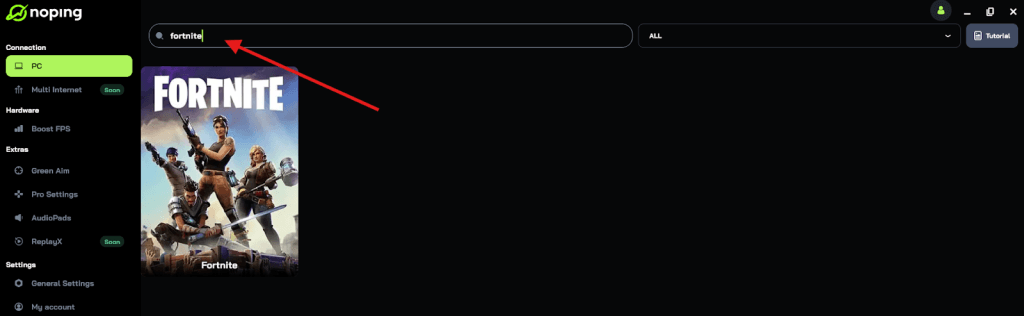
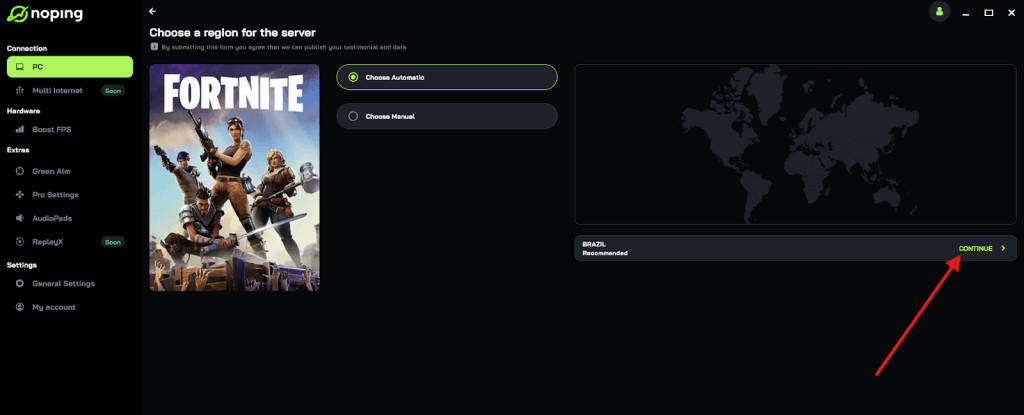
- Once you find it, click on it and, on the next screen, select “Choose automatic” or “Choose manual” and click “Continue”. We recommend choosing automatic, as NoPing’s technology analyzes all routes on a global scale and automatically selects the best option for you.
- On the next screen, click on “Optimize Game”.
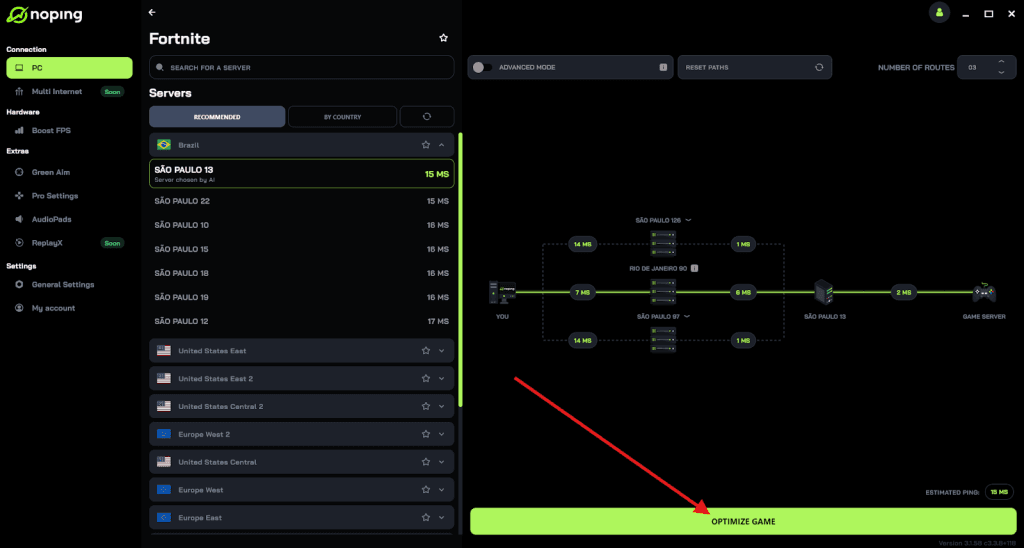
- And that’s it, you can start playing with optimized ping!
You can test different servers within NoPing to see which gives you the lowest latency.
The Future of Crossplay in War Thunder
Gaijin Entertainment, the developer of War Thunder, continues to support and expand the game's crossplay features. While there are no official announcements regarding future enhancements or changes to crossplay, the ongoing updates and community feedback suggest that the developer values this feature and may look to improve it further.
Players interested in the future of crossplay in War Thunder should keep an eye on official channels for announcements and updates.
In summary, War Thunder does support crossplay across multiple platforms, including PC, PlayStation, and Xbox.
This feature allows players to enjoy the game with friends regardless of their chosen platform, enhancing the multiplayer experience.
While there are some considerations and limitations, the overall implementation of crossplay in War Thunder is robust and continues to be a significant aspect of the game's appeal.
If you're looking to team up with friends on different platforms, enabling crossplay in War Thunder is a straightforward process that can enrich your gaming experience.
And to always enjoy a session of War Thunder with your friends without worrying about lag, use NoPing! Download now and start your free trial!