


If you are shopping for Battlefield 6 and wondering whether the Phantom Edition is worth the extra cash, this article walks through exactly what you get and how it compares to the Standard Edition.
The Battlefield 6 Phantom Edition bundles several cosmetic packs, XP boosts, and a Battlefield Pro Token that are aimed at players who want a little more flair and a head start in seasonal progression.
Below I break down the concrete contents, the likely price difference, how the extras actually work in-game, and whether those extras matter depending on what kind of player you are.
What’s included in the Phantom Edition (straight from the stores)
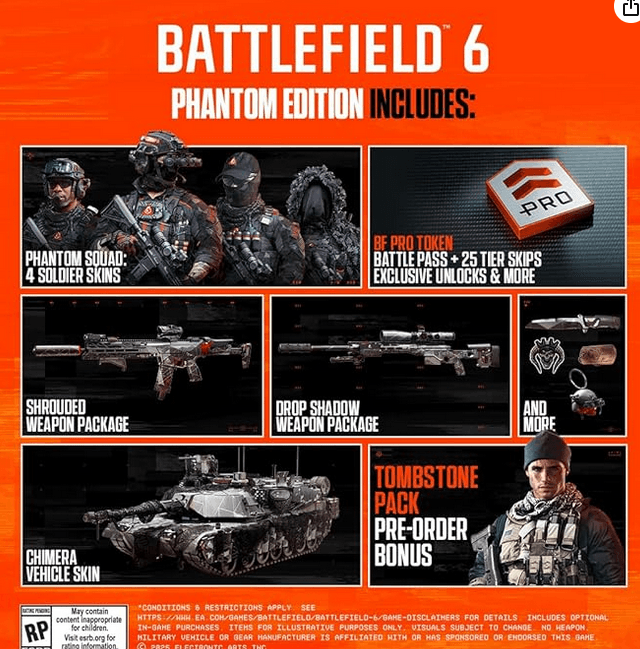
The Phantom Edition is a premium digital edition of Battlefield 6 that adds multiple cosmetic items plus progression boosts. Retail pages and official store listings show the Phantom Edition includes the following core items:
- Battlefield Pro Token (grants instant battle pass tier skips and unlocks).
- Phantom Pack, which typically contains a set of soldier skins (four Phantom Squad soldier skins are listed), a melee knife skin called “Glimmer,” and a few themed weapon packages.
- Additional weapon packages, stickers, weapon charms and a vehicle skin (example names listed on storefronts: “Shrouded” M433 pack, “Drop Shadow” MS2010 ESR pack, “Chimera” M1A2 SEPv3 vehicle skin).
- Phantom XP Boost set to speed up progression.
Those are the typical line items you see in the official product descriptions. Stores and EA’s buy pages emphasize that the Phantom Edition is mostly cosmetic and progression-focused rather than providing gameplay advantages.
Source: Amazon
Also read: Guide to Enable Secure Boot For Battlefield 6 [+ Error Fixing]
What comes with the Standard Edition
The Standard Edition is the baseline game and includes the full game experience at launch.
Pre-order bonuses that are available to all buyers are separate; for Battlefield 6 EA included a Tombstone pre-order pack for everyone who pre-ordered, while the Phantom Edition bundles its own additional cosmetic packs on top of that.
If you pre-order the Standard Edition you still get the Tombstone pack, but not the Phantom Pack or the Pro Token.
Price difference and how it’s being sold
At launch the Phantom Edition was priced as a premium digital edition. Reports and storefronts put the Standard Edition around the current AAA baseline price while the Phantom Edition sits noticeably higher.
For example, press coverage and storefront listings during pre-order showed a Phantom Edition price of around $100 (or regional equivalent), compared with the Standard Edition price near the typical $70 to $80 bracket. That premium reflects the extra cosmetic and progression items included.
Keep in mind prices vary by platform and region, and sales or discounts can change the absolute gap. If you just want the base game, the Standard Edition will always be the cheaper option.
How meaningful are the extras?
Short answer: it depends on what you care about.
If you care about cosmetics: the Phantom Pack gives you exclusive-looking soldier skins, weapon skins, and vehicle skins that you will not get from the Standard Edition. If collecting unique visual items or standing out on the battlefield matters to you, that’s where most of the value lies.
If you care about progression: the Battlefield Pro Token and XP Boosts speed up seasonal progression and can skip battle pass tiers. This is convenience and a soft time-saver rather than a gameplay advantage. It helps you reach unlocks faster but does not change core mechanics or combat balance.
If you only want the gameplay: the Standard Edition gives you the same maps, modes, vehicles, and core systems. The Phantom Edition is not pay-to-win; it gives visual and progression extras only.
Also read: How to Fix Battlefield 6 DirectX Error? Easy Guide
How the Phantom Edition rewards are accessed and a common snag
EA’s support pages explain how pre-order and edition-specific rewards appear in the game.
If you ordered a Phantom Edition, those items and the Tombstone pre-order items should be available in your Loadouts tab at launch.
EA also notes a few common hiccups players might encounter, such as items not appearing if you are logged into the wrong EA account or if your faction selection hides the skins.
For example, Phantom Edition soldier skins were reported to only display when playing as the Nato faction, so you may need to switch faction in Loadouts to see them.
If content is missing, EA’s guidance is to confirm the account, restart the game, and switch faction or platform where applicable.
That means if you buy the Phantom Edition and do not see the items, follow EA’s troubleshooting steps before assuming something is wrong.
Comparing long term value: one-off cosmetics vs ongoing purchases
One factor to weigh is how much you value one-off cosmetic bundles compared to ongoing cosmetics sold via battle pass or in-season stores.
If you are already planning to buy battle passes or season bundles, the Phantom Edition’s Pro Token can be an efficient way to get early battle-pass tiers.
Conversely, if you never buy extra cosmetics, the Standard Edition plus saving money for selective seasonal purchases may be better.
Community chatter and reporting around the Phantom Edition also suggested that some of the content mirrors items that later appear in seasonal stores or battle passes.
If exclusivity matters to you, check whether items are truly exclusive or simply pre-launch exclusives that might return.
Is Phantom Edition worth it?
Consider these quick heuristics:
- Buy Phantom Edition if you want a cosmetic bundle upfront, want to skip battle-pass tiers early, and enjoy having themed soldier/weapon/vehicle skins from day one. The convenience and visual identity tends to be the main draw.
- Skip Phantom Edition if you only care about core gameplay and don’t value early cosmetics or progression boosts. The Standard Edition grants the same gameplay for less money.
- Wait for discounts if you are price-sensitive. Premium editions are often discounted later, and some exclusive items may reappear in other forms.
How to play Battlefield 6 Without Lag?
NoPing is a service designed to optimize your route to Battlefield 6’s servers. Sometimes, the normal path your internet provider uses isn’t the fastest. NoPing reroutes your data through a better, more direct path.
Here’s how to use NoPing to fix lag in Battlefield 6:
- Sign-up through the website and download NoPing (you can try it for free)
- Open NoPing and search for Battlefield 6 inside the software
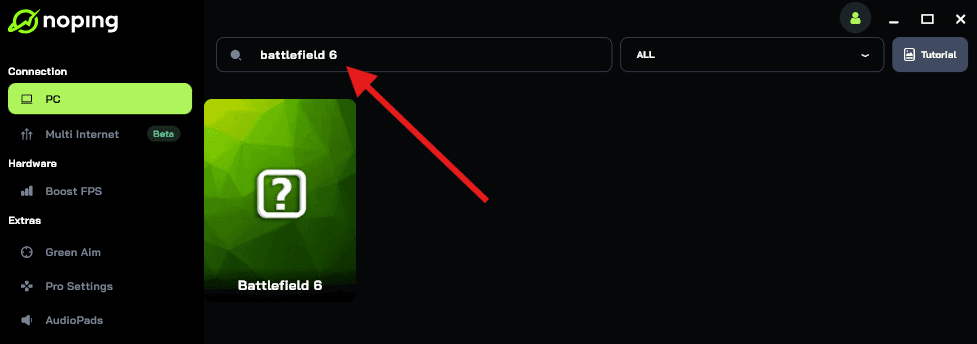
- Once you find Battlefield 6, click on it. Choose your server on the next screen and click on “Optimize Game”.
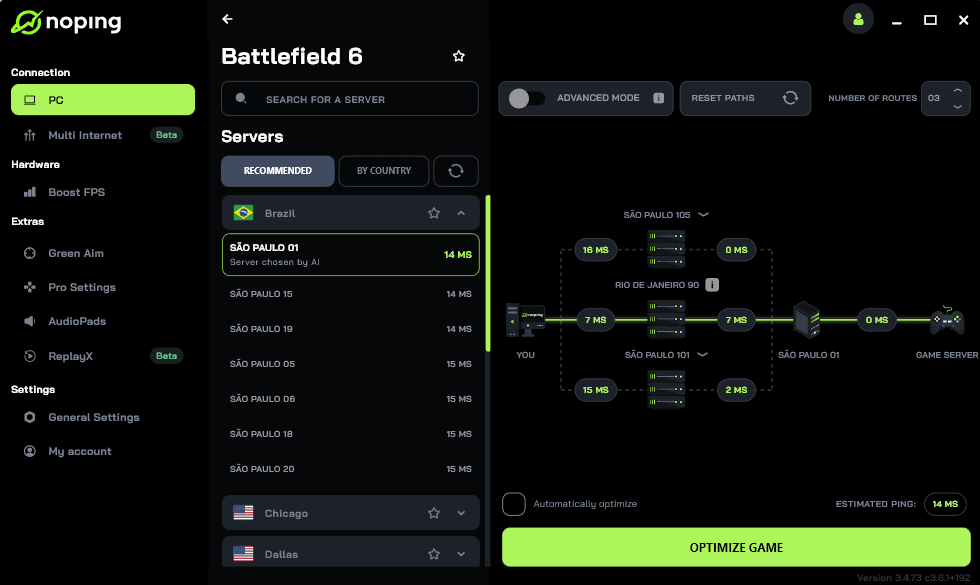
- And that’s it, you can start playing Battlefield 6 with optimized ping!
You can test different servers within NoPing to see which gives you the lowest latency.
The Battlefield 6 Phantom Edition is a premium digital edition focused on cosmetics and progression shortcuts.
It offers soldier skins, multiple weapon and vehicle skins, charms, stickers, XP boosts, and a Battlefield Pro Token to skip battle pass tiers.
Those additions are all about personalization and convenience rather than changing how the game plays.
If you value cosmetics and a quicker progression start, Phantom Edition is the sensible upgrade. If not, the Standard Edition delivers the complete gameplay experience for less money.
Play Battlefield 6 with reduced ping and optimized FPS! Download NoPing now and start your free trial!