

You might think that trying to join full servers in Roblox is a lost cause, but with the right tools and a little bit of patience, you can squeeze into almost any lobby.
Whether you are trying to play with a famous creator or simply want to jump into a high stakes competitive match that is already packed, getting past that "Server is Full" message is a skill every power user needs.
Most players just give up when they see a 12/12 or 50/50 capacity, but the reality of online gaming is that players are constantly leaving and joining.
The secret lies in being the first one to grab that vacated spot.
Why is it so hard to join full servers in Roblox?
The reason it is difficult is that Roblox has a rigid player limit for every experience to ensure performance stays stable.
When an experience creator sets a limit of 20 players, the platform strictly blocks the 21st person from entering through the standard play button.
This creates a queue system that is not always visible to the user. Instead of a formal waiting line, the "Play" button simply becomes a gatekeeper.
If you click it while the server is at max capacity, the API sends back a rejection. This is why you need a strategy that goes beyond just clicking and hoping for the best.
Can you join a full Roblox server without any tools?
Yes, you can join by using the server list manually or following a friend, though it requires precise timing and a lot of clicking.
If you are on a game page, you can scroll down to the "Servers" tab and see a list of every active instance.
This list updates periodically, but not in real time. To get in without an extension, you would have to:
- Open the game page and scroll down to the Servers section.
- Look for a server that is full but has a "Join" button that is not grayed out (though this is rare for truly full servers).
- Have a friend already in the server and spam the "Join" button on their profile.
- Refresh the page constantly to see if the player count drops from 12 to 11.
This method is frustrating because by the time the webpage refreshes, someone else has usually taken the spot. This is where your internet speed becomes a deciding factor. If your connection has high latency, the "spot open" signal reaches you later than it reaches someone else.
What are the best browser extensions for joining full servers?
The most effective way to handle this is by using BTRoblox or RoPro, which provide advanced server browsing capabilities that the native site lacks.
These extensions allow you to see more detailed information and navigate through server pages much faster than the default UI.
BTRoblox (Better Roblox) is a classic choice that cleans up the website and adds a pagination feature to the server list.
This allows you to jump to the very end of the list or search for specific player counts.
RoPro is another heavy hitter that includes "Server Filters." While many people use RoPro to find empty servers, its real time tracking can also help you identify when a popular server is about to have an opening.
These tools do not "hack" the server limit, but they give you the data you need to time your entry perfectly.
How do you use BTRoblox to get into a packed game?
To use BTRoblox for this purpose, you need to install it on a Chromium based browser like Chrome or Brave and then navigate to the game servers tab.
Once the extension is active, the server list will look different. Here is how you do it:
- Install the BTRoblox extension from the Chrome Web Store.
- Go to the Roblox game page you want to join.
- Scroll down to the Servers tab.
- Notice the new navigation buttons at the bottom of the list that allow you to skip pages.
- If you are trying to join a specific high population server, keep that page open.
- BTRoblox often allows you to see the exact player count more reliably than the standard refresh.
- Wait for the number to flick down and hit Join immediately.
The advantage here is that BTRoblox is lightweight and does not bog down your browser, meaning your "Join" request is sent as fast as your connection allows.
Is there a way to join full servers on mobile?
Joining full servers on mobile is significantly harder because you cannot install standard Chrome extensions on the mobile app.
To do this on a phone, you usually have to rely on the "Friend Join" method. If you are not friends with anyone in the server, your options are very limited.
However, some players use mobile browsers that support extensions (like Kiwi Browser on Android) to log into the Roblox website and use the same BTRoblox method mentioned above.
Once you find a spot via the browser, it will usually trigger the Roblox app to open and attempt the join. If you are strictly using the app, your only real hope is to have a friend inside and keep tapping the "Join" button on their profile until a slot opens up.
How does a low ping help you get into full servers faster?
Having a low ping is the most important technical advantage you can have because the race for an open slot is decided in milliseconds.
When a player leaves a full server, a slot becomes "Available" on the Roblox backend. Thousands of players might be trying to join that same game. The player whose "Join" request reaches the server first wins the spot.
If your ping is 150ms and another player's ping is 20ms, their request will arrive at the destination 130ms faster than yours. In the world of competitive Roblox joining, that is an eternity.
This is where NoPing comes into play. By optimizing the route your data takes, NoPing reduces the travel time between your computer and the Roblox servers.
Instead of your data taking a long, winding path through various internet service provider nodes, NoPing acts like a GPS that finds the shortest, fastest highway.
This reduces latency and minimizes packet loss, ensuring that when you click "Join," your request actually gets there without being dropped or delayed.
Here’s how to use NoPing to fix lag in Roblox:
- Sign-up through the website and download NoPing (you can try it for free)
- Open NoPing and search for Roblox inside the software
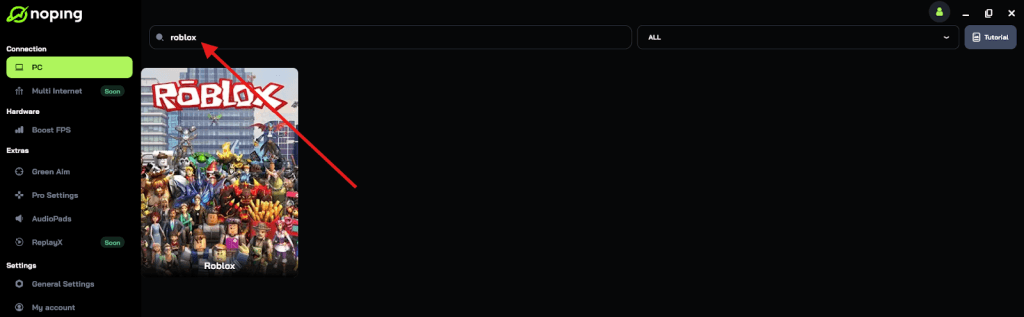
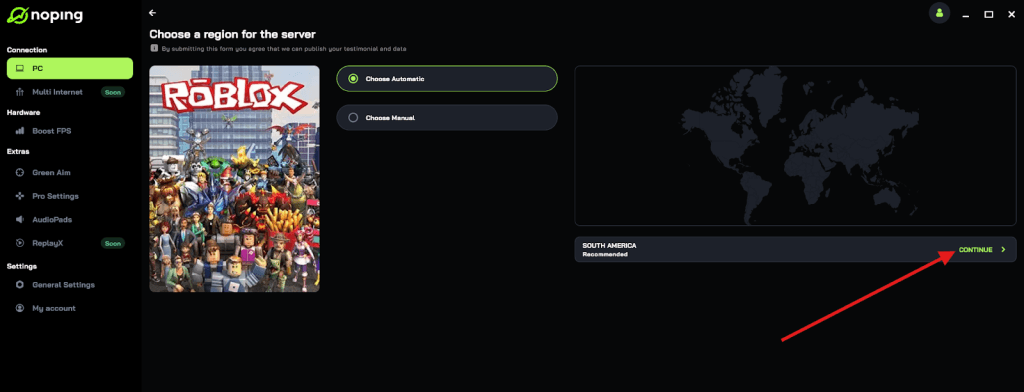
- Once you find Roblox, click on it and, on the next screen, select “Choose automatic” or “Choose manual” and click “Continue”. We recommend choosing automatic, as NoPing’s technology analyzes all routes on a global scale and automatically selects the best option for you.
- On the next screen, click on “Optimize Game”.
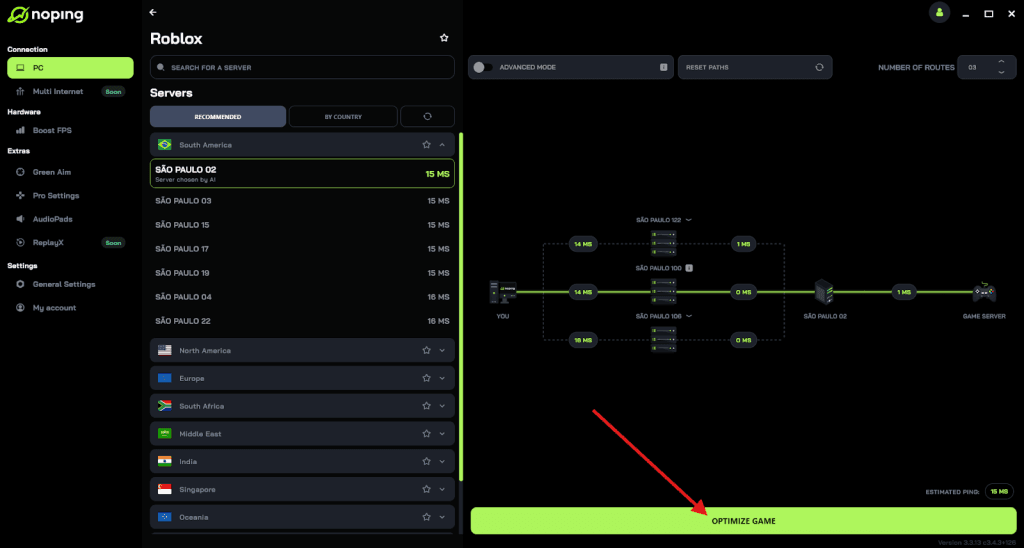
- And that’s it, you can start playing Roblox with optimized ping!
You can test different servers within NoPing to see which gives you the lowest latency.
What should you do if you get Error Code 524?
Error Code 524 usually means you do not have permission to join the server, which often happens when you try to join a full VIP server or a restricted lobby.
Even if you use the methods above, you might run into this wall. It is not always about the server being full; sometimes it is about the privacy settings of the players inside or the game itself.
To fix this, you should check your own privacy settings:
- Go to your Roblox Account Settings.
- Click on the Privacy tab.
- Look for the section titled "Who can invite me to private servers?" and set it to "Everyone."
- Check "Who can join me in experiences?" and ensure it is set to "Everyone" or "Friends" depending on your needs.
If your settings are correct and you still see Error 524, it likely means the server has been set to "Private" by the owner, or the specific instance you were trying to "snipe" has been closed.
Can you use the Roblox API to find a spot?
For the tech savvy players, using the Roblox Web API is a way to look at server data without even opening the website.
This is how many "server seeker" scripts work. By sending a GET request to the Roblox games API, you can see a JSON list of every server instance, its current player count, and its "id."
While you cannot join directly through a raw API call without the client, you can use this data to find which servers are at 11/12 capacity before the website UI even updates.
Some players use custom console scripts to monitor these numbers and alert them the moment a spot opens.
It is a bit "overkill" for most, but if you are trying to get into a server with a specific YouTuber, this is the pro way to do it.
Are these methods safe for your Roblox account?
Using well known extensions like BTRoblox and RoPro is generally considered safe, but you should always be careful about what you install.
These extensions are used by millions of players and are open source or highly scrutinized. They do not steal your password or "hack" the game; they simply change how the data is displayed on your screen.
However, you should never use "auto joiners" that ask for your account ".ROBLOSECURITY" cookie.
That cookie is your session token, and giving it away is the same as giving someone your password.
Stick to reputable browser extensions and manual techniques. As long as you are not violating the Roblox Terms of Service by attempting to crash servers or bypass security, you are in the clear.
Is it worth trying to join a full server?
It is absolutely worth it if you are part of a clan, a competitive team, or a community event. The "Server is Full" message is a hurdle, not a wall.
By combining the power of BTRoblox for better visibility and NoPing for the fastest possible connection, you turn a game of luck into a game of speed.
When you eliminate lag and jitter, your browser and game client communicate with Roblox much more efficiently.
This means your clicks are registered faster and your data packets travel a cleaner path. If you are tired of being left behind while your friends are having fun in a packed lobby, optimizing your connection is the first step.
Play Roblox without lag. Download NoPing now and start your free trial!