

Error code 524 in Roblox appears when you try to join an experience and Roblox tells you “You do not have permission to join this experience” (or similar).
It’s one of those annoying messages that stops you at the gate and makes you wonder whether the problem is your account, the game, or Roblox itself.
In this guide I’ll explain what the code usually means, why it shows up, and, importantly, how to fix or work around it.
What is Error Code 524 in Roblox?
Error code 524 typically means the platform blocked your attempt to join a particular experience or private server because Roblox or the experience’s settings think you’re not allowed in.
The exact message you’ll see is usually something like “You do not have permission to join this experience” or “Not authorized to join this game.”
This can happen when attempting to join VIP/private servers, when the join link is used in a way Roblox doesn’t expect, or when a client-server handshake fails and Roblox treats the attempt as unauthorized.
Two high-level categories behind the words “no permission”:
- Permission / invitation issues — the server is restricted, you’re not on the allowed list, or the invite link is broken.
- Platform / server bug or status problem — the Play button, VIP server link handling, or Roblox server routing is behaving incorrectly. Community threads show this has appeared as a bug multiple times.

Source: Reddit
How to Fix Error Code 524 in Roblox?
Below are practical steps ordered from fastest/easiest to more involved.
Try them from top to bottom; many players fix the problem within a couple of attempts.
Check whether the server is a VIP/private server and your invite is valid
If you try to join a VIP (private) server you must be on its allowed list or using a valid invite.
If you were invited, confirm the invite wasn’t revoked and that you are logged into the account that received the invite.
If you’re trying a public link to a private server (for example, a link copied from Discord or a website), it may not work.
Join from the server list instead of the Play button or link
Some users report that although the Play button or a direct link produces 524, selecting a server from the game’s public server list works fine.
Open the game page, click “Servers” (or “Servers” tab) and join a listed server manually. This bypasses certain link-related bugs.
Sign out and sign in again / restart Roblox
Simple but effective: sign out, restart the Roblox client (or browser), then sign back in. If an authentication token or session was stale, this refresh often clears it.
Check Roblox status page
If Roblox itself has server issues or maintenance, many people may get 524 at the same time.
Check the official Roblox status page or reliable outage trackers before doing heavy troubleshooting; if it’s a platform outage, you’ll need to wait.
Try a different device or browser
If possible, try joining from another device (mobile, PC, or vice versa). That can reveal whether the problem is device-specific.
Clear browser cache or reinstall the Roblox app
Corrupted local files or cached sessions can produce odd behavior. Clear your browser’s cache and cookies or reinstall the Roblox client.
Check account and privacy settings
If your account has restrictions (for example, child account settings or contact restrictions), verify those settings.
Also make sure the account you’re using is the one the server’s owner expects.
Ask the experience owner / server host
If the server is private: contact the person who owns the VIP server and confirm you’re on their allowed list. If you can’t reach them, explain what you see — they may need to reissue the invite or check their server settings.
Roblox support cannot remove bans issued by experience creators, so the owner is the right contact for VIP bans and per-game blocks.
Use NoPing to stabilize your connection
Network instability can sometimes cause permission-like failures during the connection handshake.
One of the practical fixes is to stabilize your connection with a network optimization tool.
NoPing routes game traffic more reliably and lowers packet loss/jitter for some players, which can make the handshake succeed where an unstable connection caused the platform to reject the join.
Here’s how to use NoPing to stabilize your connection in Roblox:
- Sign-up through the website and download NoPing (you can try it for free)
- Open NoPing and search for Roblox inside the software
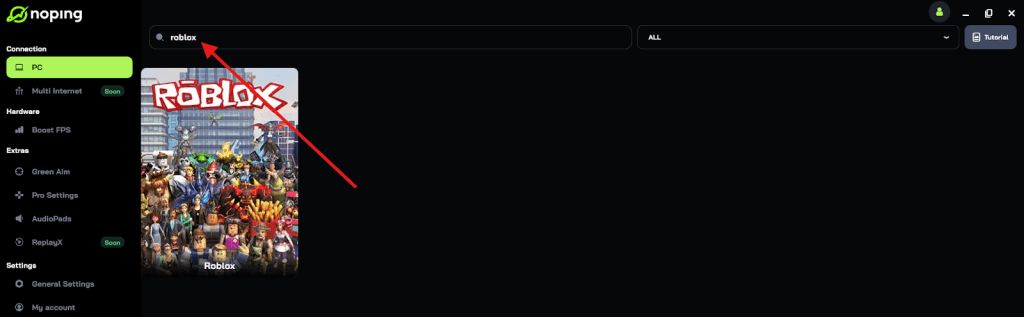
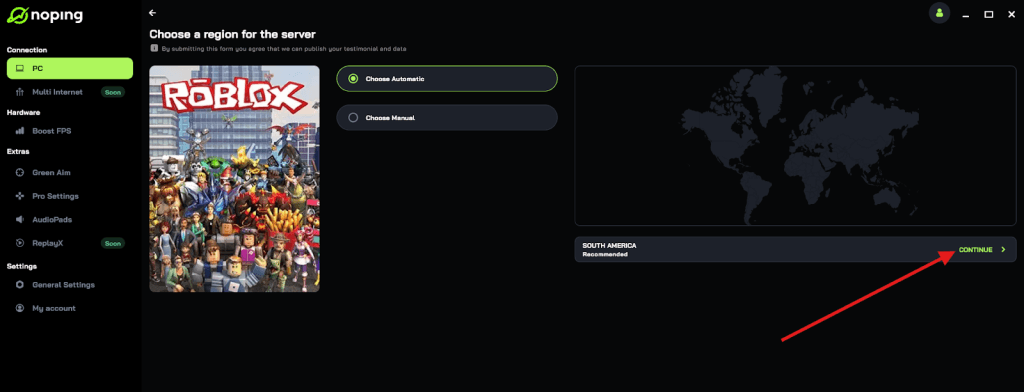
- Once you find Roblox, click on it and, on the next screen, select “Choose automatic” or “Choose manual” and click “Continue”. We recommend choosing automatic, as NoPing’s technology analyzes all routes on a global scale and automatically selects the best option for you.
- On the next screen, click on “Optimize Game”.
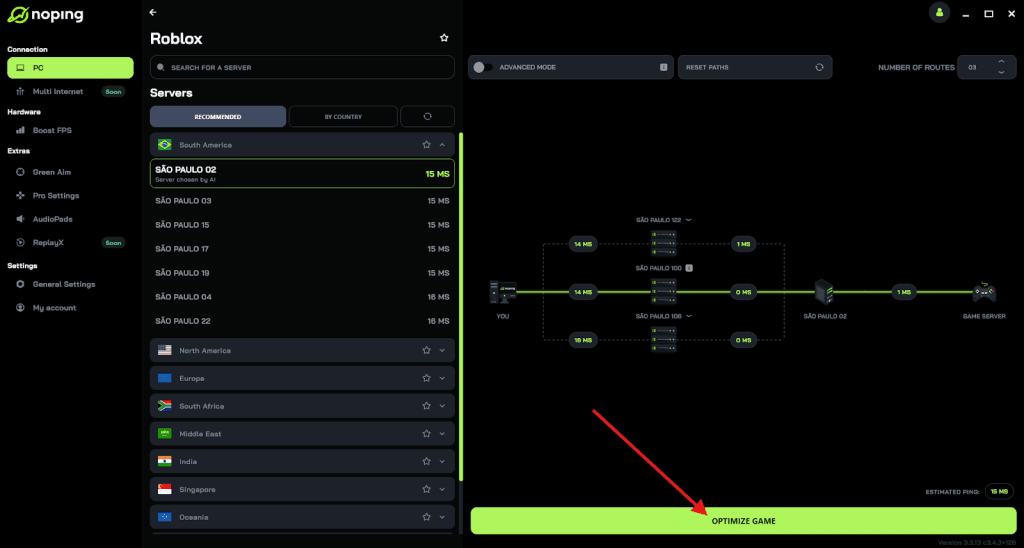
- And that’s it, you can start playing Roblox with optimized ping!
You can test different servers within NoPing to see which gives you the lowest latency.

What Causes Error Code 524 in Roblox?
Short list of the most common root causes:
- Private/VIP server permission issues — not on the allowlist or invite link invalid.
- Roblox platform bug or server-side routing problem — Play-button join or link handling bug reported in DevForum and known incidents.
- Local client/session/authentication problems — stale session tokens, corrupted cache, or client bugs.
- Network instability or timing out during the join handshake — poor connectivity can cause the attempt to be treated as unauthorized. Tools that stabilize routes or reduce packet loss (like NoPing) can help in some cases.
Two notes on cause diagnosis:
- If the error is limited to one game or just when using a particular link, it’s most likely permission/invite-related.
- If many players are affected at the same time, or joining via the server list works while Play fails, it’s more likely a Roblox-side issue or a known bug.
Other Error Codes in Roblox
Below are the meanings of a few other common error codes you asked about, with the short explanation and what to try.
- Error Code 600 — Like 267 in some senses, 600 typically indicates you’ve been banned from an experience by the game creator (a creator-issued ban). You’ll see this when the creator has blocked your account from that experience. Contact the experience owner if you believe it’s a mistake.
- Error Code 0 — This is a generic network/connection failure that can appear in many contexts. Often it means the client couldn’t get a useful response from Roblox; restarting the client, checking internet, or reinstalling can help. (Because it’s generic, the right fix depends on additional context.)
- Error Code 277 — “Lost connection to the game server, please reconnect.” Usually indicates a dropped/unstable connection between your client and the game server. Check your internet, update drivers, or try another network.
- Error Code 279 — “Failed to connect to the game,” often a client-server connection problem similar to 277. Reinstalling, disabling browser extensions, checking firewall/router settings, or trying a different network often helps.
- Error Code 267 — “Banned from an experience” or kicked by a game script. This one is usually caused by the game’s internal scripts (admin kicks) or a creator-issued ban; Roblox cannot remove bans issued by experience creators.
(If you want a deep-dive for any single code above, I can expand the troubleshooting steps for that code.)
FAQ - Error Code 524 in Roblox
Q — I get 524 only when clicking a specific invite link. Other links work fine. What now?
A — That often means the link itself is problematic (expired, malformed, or intended for a private server you aren’t authorized for). Try joining via the server list, ask the invite sender to reissue the invite, or have the host check their VIP settings.
Q — Will waiting fix it?
A — If the cause is a Roblox server bug or an outage, yes: waiting until Roblox resolves it is often the only option. Check Roblox’s status or community channels to confirm.
Q — Can Roblox Support remove a ban from an experience for me?
A — No. If the ban was issued by the experience owner (codes 267 and 600), Roblox Support cannot remove it; you must contact the experience creator/owner.
Q — I tried everything and still get 524 when joining via the Play button, but server list works. Is that safe?
A — Yes, joining from the server list is a valid workaround. It indicates the issue is with link/Play-button handling or a specific join method, not with your ability to play the game. Developers and Roblox engineers sometimes use that clue to track the bug.
Error code 524 in Roblox is frustrating because the message is about permission but the true cause can be either a permission/invite issue or a platform/network problem.
So, to always avoid network errors in Roblox, use NoPing! Download now and start your free trial!