

Error code 267 in Roblox appears when your client is kicked out of an experience, sometimes because the experience’s creator has banned you, sometimes because an in-game script intentionally disconnects players, and other times because of network or client-side issues.
The message rarely explains what specifically happened, so players jump between blaming their ISP, game script bugs, anti-cheat systems, or Roblox itself.
In this article I’ll explain what the error actually means, walk you through a practical step-by-step guide to fix it
What is The Error Code 267 in Roblox?
Error Code 267 is the code Roblox shows when a player is forcibly removed from an experience.
The removal can be implemented by the experience (the game) itself, for example via server scripts that call a kick or ban action, or can be caused by the platform or network when something looks wrong with the connection or client.
In many cases the in-experience message will say something like “You were kicked from this experience” and sometimes will include a ban duration if the creator used a timed ban. Roblox’s help documentation describes 267 as a ban/kick issued by the experience creator rather than a site-wide Roblox ban.
That definition helps you triage: if the message explicitly mentions a ban and shows a duration, that’s a creator ban and you can’t bypass it, you have to wait or contact the creator.
If the message is vague (“unexpectedly kicked” or similar), the cause is more likely a script trigger, anti-cheat false positive, or a connection glitch and you can try fixes.

Source: Reddit
Guide to Fix Error Code 267 in Roblox
Below is a practical list of fixes you can try to solve error code 267 in Roblox.
Each step targets a specific type of cause, from simple client-side issues to more complex network or script-related problems. Try them in order, starting with the easiest.
1. Read the exact message first
Before doing anything, pay attention to the full text of the error.
If it says “You were banned” and includes a duration, that’s a direct ban from the experience creator. In that case, you can’t bypass it. You’ll need to wait until the ban expires or reach out to the creator if you believe it was a mistake.
Roblox Support makes it clear that creator-issued bans are handled by the game owner, not Roblox itself.
2. Try a different experience or server
Join another public game or even a different server of the same experience.
If you can join other games without issues, it means the problem is specific to that experience or its current server. This quick test helps you figure out whether it’s a platform-wide issue or something limited to one game.
3. Restart Roblox and your device
Sometimes, the simplest fix works best. Completely close Roblox, or the browser tab if you’re playing on the web, and restart your computer, phone, or console.
This clears temporary connection or cache issues that may have triggered the error.
4. Remove scripts, exploits, or third-party tools
If you’ve installed any unauthorized add-ons, admin scripts, or exploit tools, remove them immediately.
Many Roblox experiences use anti-cheat scripts that automatically kick players who trigger suspicious behavior. Even harmless tools can get flagged and result in a 267 error.
For developers, it’s worth checking your own code for misplaced :Kick() functions or buggy anti-cheat scripts.
5. Disable browser extensions or switch browsers
If you play through a browser, extensions like ad blockers or script filters might interfere with Roblox’s connection process.
Disable all extensions, then try launching the game again. If that doesn’t help, switch to another browser such as Chrome, Edge, or Firefox to test whether the issue persists.
6. Allow Roblox in your firewall and antivirus
Firewalls and antivirus software can sometimes block Roblox’s necessary traffic.
Go to your security software’s settings and make sure Roblox is added to the exception list. Alternatively, you can temporarily disable your antivirus and firewall to test if they’re the cause; just don’t forget to turn them back on afterward.
7. Check your network connection
Unstable or weak internet connections are one of the most common reasons for 267 errors.
Here’s what to do:
- If possible, use a wired Ethernet connection instead of Wi-Fi.
- Restart your router or modem.
- Test another network, such as a mobile hotspot, to see if the issue disappears.
If changing the network fixes the problem, it’s likely something with your ISP or router configuration.
8. Use NoPing to stabilize your connection
If you suspect lag spikes or unstable routing are causing disconnections, try using NoPing.
NoPing is a network optimization software designed to reduce ping and stabilize your game connection by rerouting your traffic through faster, more reliable routes.
For Roblox players who face frequent kicks or high latency, this can make a big difference.
Here’s how to use NoPing to avoid network errors in Roblox:
- Sign-up through the website and download NoPing (you can try it for free)
- Open NoPing and search for Roblox inside the software
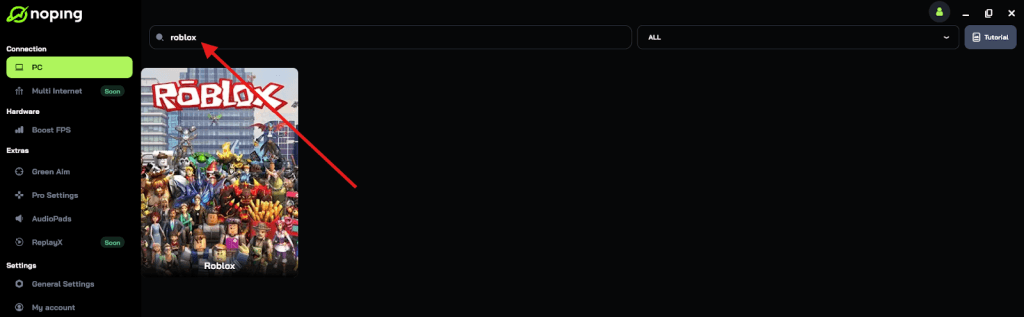
- Once you find Roblox, click on it and, on the next screen, select “Choose automatic” or “Choose manual” and click “Continue”. We recommend choosing automatic, as NoPing’s technology analyzes all routes on a global scale and automatically selects the best option for you.
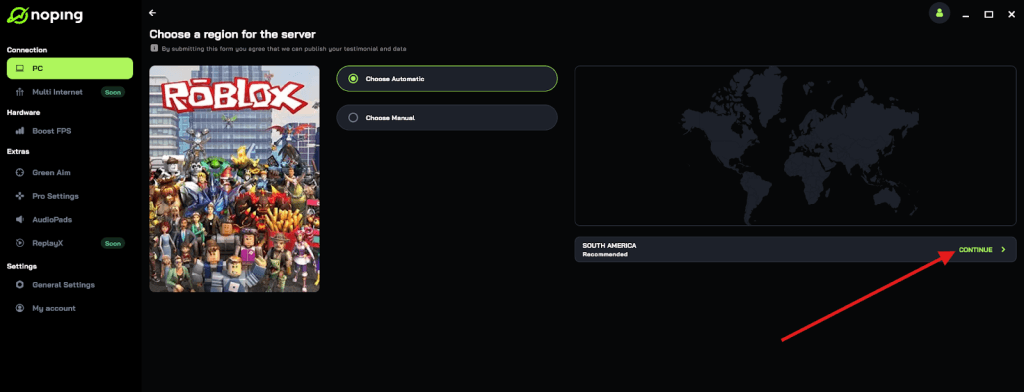
- On the next screen, click on “Optimize Game”.
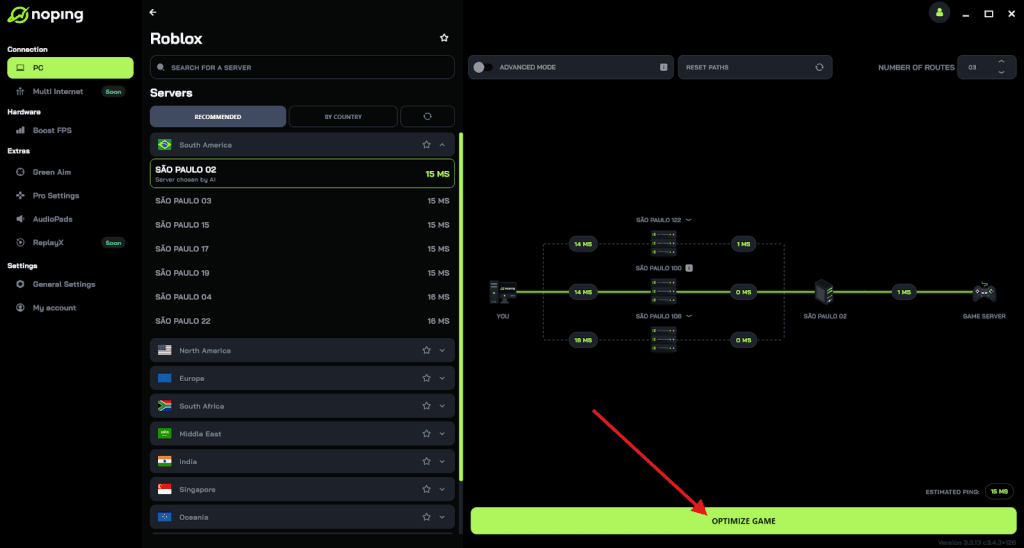
- And that’s it, you can start playing Roblox with optimized ping!
You can test different servers within NoPing to see which gives you the lowest latency.
9. Reinstall Roblox or clear the cache
If none of the previous fixes worked, your Roblox installation might be corrupted.
Uninstall Roblox completely, restart your device, and then reinstall it from the official website or app store. On mobile, you can also clear the app cache before reinstalling. This ensures all files are fresh and error-free.
10. Contact the experience creator or Roblox Support
If you’ve tried everything and the problem persists, it’s time to reach out.
If the error message mentions a ban or kick, contact the experience creator, they control those bans, not Roblox Support. If you think there’s a platform-level issue instead, gather screenshots and error details, then submit a ticket to Roblox Support.
You can also check the Roblox DevForum to see if other players or developers are reporting similar issues. Sometimes the cause is a widespread server-side bug that only Roblox can fix.

What Causes Error Code 267 in Roblox?
Here are the recurring root causes you’ll encounter:
- Creator-issued ban or kick — the experience creator intentionally banned or kicked your account from that experience. That’s the clearest case and is shown in Roblox documentation.
- In-experience scripts / anti-cheat false positives — many experiences run anti-exploit logic that kicks players who trigger suspicious patterns. Faulty script logic or overly aggressive anti-cheat can cause legitimate players to be kicked. Devs on the Roblox DevForum frequently troubleshoot :Kick() locations when players report mass 267 kicks.
- Network instability / high latency / packet loss — when your connection to the server is unstable, the client-server handshake can fail or look suspicious, and you may be disconnected with a 267 or other connection error. Guides and troubleshooting pages list network fixes as common solutions.
- Client or cache corruption — corrupted client files or bad cached data can cause odd disconnects that appear as 267; reinstalling fixes these cases.
- Platform/Roblox server side issues — sometimes servers or teleportation systems have problems that kick or drop players; when that’s happening the issue affects many users and you’ll see reports on status pages or forums.
Other Error Codes in Roblox (600, 0, 277, 279)
If you’re troubleshooting a 267, you may run into other error codes; here’s a short primer on the ones you asked to cite:
- 600 — Error Code 600
Usually means your account was banned from that experience (creator-issued) or there’s a restriction preventing access. Roblox Support has a dedicated page explaining 600 as creator-issued bans and restrictions. - 0 — Error Code 0
Error 0 is a generic authentication/connection error that indicates Roblox can’t complete a request (often network or server-side). Fixes are similar to connection troubleshooting: check server status, restart router/client, try different network or disable firewall temporarily. Third-party troubleshooting articles cover common 0 fixes. - 277 — Error Code 277
This code specifically means the client lost connection to the game server — a classic network drop or server failure. Roblox’s support article for 277 lists platform troubleshooting by OS because it’s fundamentally a connection loss. - 279 — Error Code 279
Error 279 (sometimes shown with ID=17) is “failed to connect to the game” — the client couldn’t establish or maintain the connection. It commonly points to firewall issues, ISP routing problems, or server IPs that are offline. Roblox has an official page describing 279 and platform-specific fixes.
FAQ - Error Code 267 in Roblox
Q — If I’m banned, can Roblox support remove it?
A — If the ban is issued by the experience creator, Roblox Support cannot remove it for you. You must contact the game creator or wait for the ban duration to expire; Roblox’s article on 267 explicitly clarifies creator-issued bans are outside Roblox Support’s removal powers.
Q — Could Roblox ban my whole account because of a 267 kick?
A — Not necessarily. A 267 is often a per-experience ban or kick; platform-wide account suspensions are separate and show different messages (and are enforced by Roblox moderation). A 267 does not automatically mean your account is disabled platform-wide.
Q — I’m a dev: how do I prevent false 267 kicks in my game?
A — Audit your anti-exploit scripts, throttle remote events, add server-side rate limits, avoid kicking players for borderline reasons, and log kick reasons. DevForum threads show many 267 incidents trace back to faulty anti-cheat or remote flooding. Proper server-side validation and rate limiting greatly reduce false positives.
Error Code 267 is often inconvenient but, crucially, it’s usually diagnosable. First check the error text for an explicit ban, then try the quick network/client fixes in the guide.
And to avoid these network errors while playing Roblox, use NoPing! Download now and start your free trial!