


Using a VPN for Roblox is one of the smartest moves you can make if you are tired of dealing with lag, regional blocks, or those annoying school network restrictions.
Whether you are building an empire in Tycoon games or competing in high stakes combat simulators, a stable connection is the difference between a win and a frustrating disconnect.
This is where a Virtual Private Network (VPN) or a dedicated gaming optimizer comes in. These tools do not just hide your IP address; they change the way your data travels across the internet to ensure you get the fastest path to the game servers.
In this guide, we are going to break down why you need one, the legal side of things, and which ones actually work in 2026.
Why should you use a VPN for Roblox?
You should use a VPN for Roblox to bypass network restrictions, avoid ISP throttling, and protect yourself from DDoS attacks.
Many schools and workplaces block gaming sites to keep people focused, but a VPN encrypts your traffic so the local network cannot see what you are doing.
This allows you to log in and play during your break without any issues.
Beyond just unblocking the game, there is the issue of ISP throttling. Some internet service providers intentionally slow down your connection when they detect heavy gaming or streaming traffic.
By using a VPN, your ISP cannot see that you are playing Roblox, which often results in a more consistent and faster connection.
Furthermore, security is a major factor. In competitive Roblox communities, DDoS attacks are a real threat. A VPN masks your actual IP address, so if someone tries to flood your connection with junk data, they will hit the VPN server instead of your home router.
Is it legal to use a VPN on Roblox?
Yes, it is legal to use a VPN on Roblox, though you must follow the platform's Terms of
Service to avoid getting flagged. Roblox does not explicitly ban VPNs for general use, such as protecting your privacy or improving your connection.
Thousands of players use them every day without any trouble.
However, you should avoid using a VPN to bypass a ban or to access regional prices that do not apply to you.
If the system detects that you are using a VPN to circumvent a prior disciplinary action, your account could be at risk.
As long as you are using the service to improve your ping or keep your data safe, you are generally in the clear.
Many players even find that a VPN helps them avoid false IP bans that sometimes happen on shared networks like those in apartment buildings or university dorms.
Can a VPN actually lower your ping in Roblox?
Yes, a VPN can lower your ping if your current internet routing is inefficient or if your ISP is throttling your connection.
While it might seem counterintuitive that adding an extra "stop" in the connection path could make things faster, it works because of "Internet GPS" logic.
Normally, your data might take a long, winding path through several slow servers before reaching Roblox.
A gaming VPN or a tool like NoPing finds the most direct route possible. By cutting out unnecessary hops, you can see a significant drop in latency.
This is especially helpful if you are playing on servers located in a different country. Instead of letting your ISP decide the path, the software forces your data through high speed, dedicated gaming lanes.
What are the best VPNs for Roblox in 2026?
The best VPNs for Roblox prioritize speed, low latency, and a massive network of servers to ensure you always have a stable connection.
While there are many options on the market, only a few are truly optimized for the fast paced nature of gaming.
1. NoPing
NoPing is the top choice for Roblox players because it is a dedicated gaming optimizer rather than just a standard VPN.
While traditional VPNs focus heavily on privacy and encryption (which can sometimes add lag), NoPing focuses on finding the shortest route between your PC and the game server. It functions like an "Internet GPS" for your games.
It supports over 3,000 games and features a specialized "Boost FPS" tool that optimizes your computer's background processes to give the game more resources.
For Roblox specifically, it helps eliminate those random ping spikes that occur during crowded multiplayer sessions.
Since it uses multi-routing technology, if one path becomes unstable, it automatically switches you to a better one without dropping your connection.
Here’s how to use NoPing to fix lag in Roblox:
- Sign-up through the website and download NoPing (you can try it for free)
- Open NoPing and search for Roblox inside the software
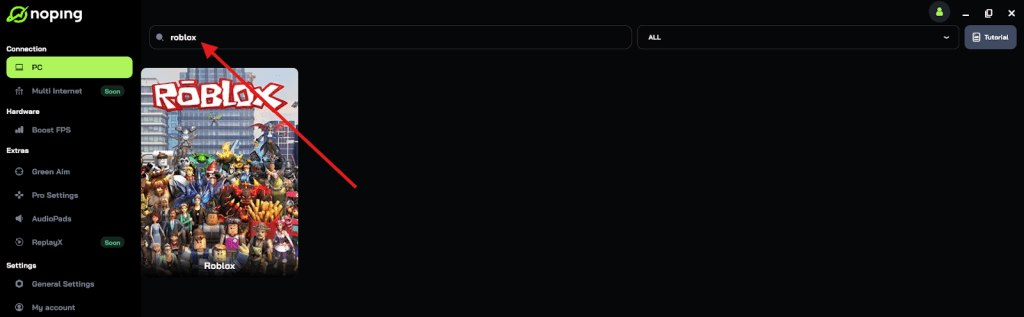
- Once you find Roblox, click on it and, on the next screen, select “Choose automatic” or “Choose manual” and click “Continue”. We recommend choosing automatic, as NoPing’s technology analyzes all routes on a global scale and automatically selects the best option for you.
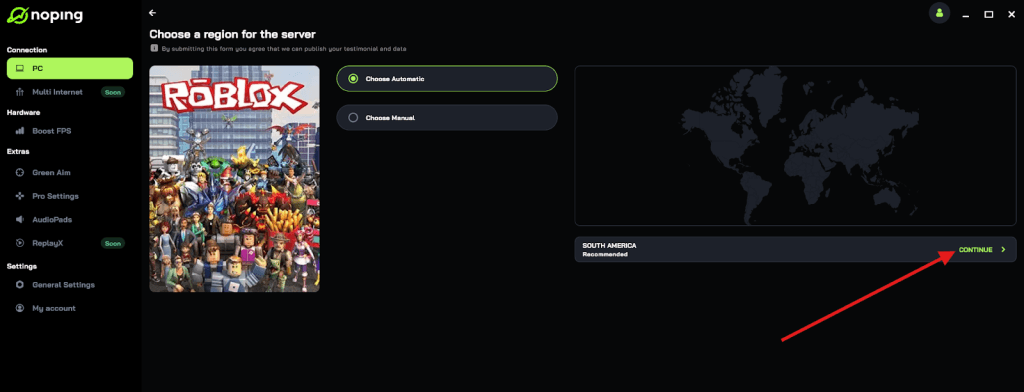
- On the next screen, click on “Optimize Game”.
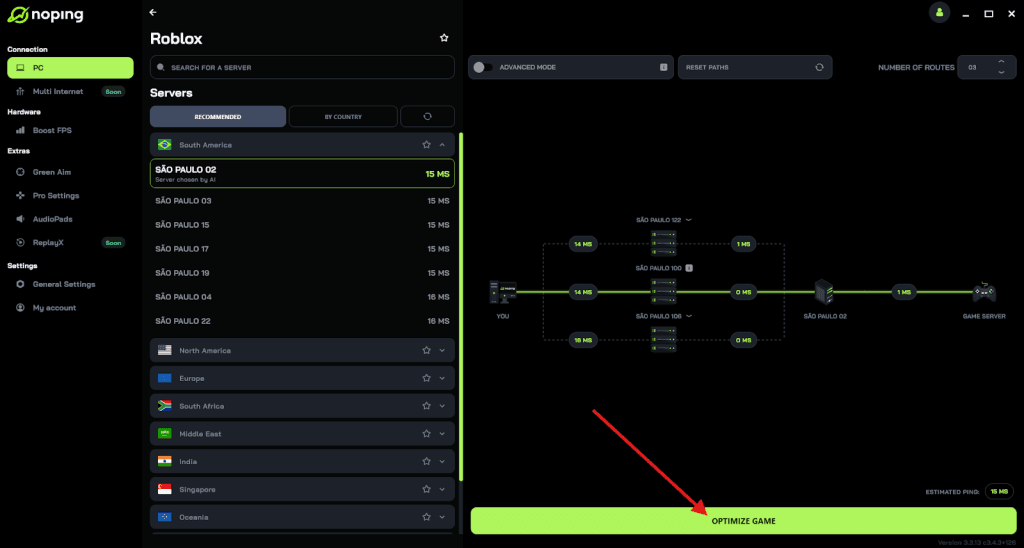
- And that’s it, you can start playing Roblox with optimized ping!
You can test different servers within NoPing to see which gives you the lowest latency.
2. ExpressVPN
ExpressVPN is widely known for its incredible speeds and ease of use. It has a vast network of servers in over 100 countries, which makes it perfect for finding a low latency connection no matter where you are.
Its "Lightway" protocol is designed to be faster and more reliable than traditional VPN protocols, which is a huge plus for gamers who cannot afford a split second of lag.
3. NordVPN
NordVPN is a powerhouse when it comes to security and server variety. One of its standout features for Roblox players is "Meshnet," which allows you to create a secure, private network for your friends.
This can be great for organizing private game sessions or ensuring that your group has a stable connection to the same region. It also offers dedicated IP addresses if you want to avoid the issues associated with shared VPN IPs.
4. Surfshark
Surfshark is the best budget friendly option that does not sacrifice performance. One of its biggest draws is that it allows for unlimited simultaneous connections.
This means you can protect your PC, your phone, and your tablet all at the same time without needing multiple subscriptions. It also features a "Camouflage Mode" which makes your VPN traffic look like regular web traffic, helping you bypass even the toughest school firewalls.
5. Private Internet Access (PIA)
PIA is a favorite for users who like to customize their connection. It offers a massive server network, which reduces the chance of landing on a crowded server that slows you down.
For Roblox players on PC, its advanced split tunneling allows you to run Roblox through the VPN while keeping your other apps on your regular home connection. This ensures that your gaming speed is not affected by background downloads or browsing.
How do you set up a VPN for Roblox?
Setting up a VPN for Roblox is a straightforward process that only takes a few minutes. Whether you are on a PC or a mobile device, the steps are very similar.
Here is how you can get started with an optimizer like NoPing or a standard VPN:
- Create an account on the provider's official website.
- Download the application compatible with your operating system (Windows, iOS, or Android).
- Install the software and log in with your credentials.
- Search for "Roblox" in the app's search bar.
- Select a server that is physically closest to the Roblox server location (usually US East, US West, or Europe).
- Click the "Optimize" or "Connect" button.
- Launch Roblox and enjoy a smoother experience.
If you are using NoPing, it is even easier because the software can automatically analyze all available routes and pick the fastest one for you without any manual trial and error.
Will a VPN fix Roblox Error Code 279?
Yes, a VPN can often fix Error Code 279, which is usually a connection issue related to your network's inability to communicate with the Roblox servers.
This error often pops up when your firewall is too strict or when your ISP's routing to a specific server is broken.
By connecting to a VPN, you essentially bypass the "broken" part of your local network or ISP route.
The VPN creates a fresh tunnel that can slip through firewalls and reach the game servers when a standard connection fails. If you keep seeing this error even after restarting your router, switching to an optimized server via NoPing or a VPN is usually the fastest fix.
Does using a VPN impact FPS in Roblox?
No, a standard VPN typically does not affect your Frames Per Second (FPS) because FPS is dependent on your hardware, not your internet connection.
However, some gaming focused tools actually improve your FPS.
For instance, NoPing includes a feature called "Boost FPS." This tool works by managing how your Windows operating system handles background tasks while the game is running.
It can close unnecessary processes and give Roblox higher priority in your CPU and RAM usage.
So, while a basic VPN only helps with ping, a dedicated tool can actually make your game run smoother on a visual level as well.
Can you use a VPN for Roblox on mobile?
Yes, you can use a VPN for Roblox on both Android and iOS devices. Most top tier providers have dedicated apps in the Google Play Store and the Apple App Store.
Playing Roblox on mobile over public Wi-Fi (like at a cafe or airport) can be risky and laggy, so using a VPN is highly recommended in those situations.
The process is simple: you open the VPN app on your phone, connect to a server, and then open the Roblox app.
The encryption will keep your account details safe from anyone snooping on the public network, and the routing optimization will help prevent those annoying lag spikes that often plague mobile gaming.
What should you look for in a Roblox VPN?
When choosing a VPN for Roblox, you should look for three main things: low latency, a "Kill Switch" feature, and a large server network.
Not all VPNs are built for gaming; some are designed purely for privacy and can actually make your ping worse.
- Low Latency: This is the most important factor. You want a service that has servers optimized for fast data transfer.
- Kill Switch: This feature automatically cuts your internet if the VPN connection drops, preventing your real IP from being exposed mid-game.
- Obfuscation: If you are trying to play at school, you need "obfuscated" servers that hide the fact that you are using a VPN at all.
- Server Count: More servers mean less congestion. If 10,000 people are trying to use the same VPN server, everyone is going to lag.
Finding the right VPN for Roblox can completely change how you play. It stops the frustration of lagging out during a competitive match and keeps your account safe from the darker side of the internet.
While standard VPNs like ExpressVPN and NordVPN offer great all around protection, a specialized tool like NoPing is the best bet if your primary goal is the absolute lowest ping and highest FPS possible.
No matter which one you choose, the added stability and security are worth the small effort of setting it up.
Play Roblox without lag. Download NoPing now and start your free trial!