


Short answer up front: yes, Battlefield 6 supports crossplay and cross-progression, but there are important caveats and settings you should know about before you squad up with friends on different platforms.
Battlefield 6 cross platform functionality is designed to let players on PC, PlayStation 5 and Xbox Series X|S play together, while trying to balance matchmaking and anti-cheat concerns.
Below I walk through what works, what does not, how to control it, and practical pros and cons so you can decide whether to enable crossplay or keep your matches console-only.
What does “cross platform” mean here?
When people ask if a game is cross platform they usually mean one of three things
- crossplay: can I play with friends on other platforms
- cross-progression or cross-save: does my progression and unlocks carry across platforms
- cross-generation: will old and new generation consoles play together
Battlefield 6 implements crossplay and cross-progression in clear ways, and it groups platforms by modern generation. That means PC, PS5 and Xbox Series X|S are part of the same crossplay pool.
Crossplay: who can play with whom?
Battlefield 6 supports crossplay across PC, PS5 and Xbox Series X|S. Console players will generally be matched with other console players first, but full crossplay is possible when needed.
EA and DICE describe the matchmaking approach as prioritizing same-console matches for consoles while still allowing PC players into matches if player numbers require it.
In practice this is often described as console-preferred crossplay.
Important details:
- PC, PS5 and Xbox Series X|S are supported in the crossplay pool.
- Older consoles like PS4 and Xbox One are not part of the modern-generation crossplay pool if you are playing with PS5/Xbox Series matches. Historically Battlefield titles grouped by generation to avoid performance mismatches, and BF6 follows the modern-generation grouping.
Also read: Battlefield 6 Player Count: How Many People Play The Game?
Can you turn crossplay off?
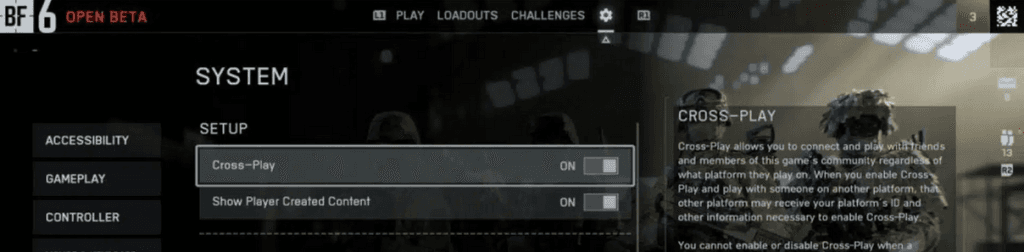
Yes, you can toggle crossplay settings in the game. Console players have an option to disable PC crossplay to avoid matching against PC players, which is useful for those worried about keyboard and mouse advantages or PC cheating.
However, EA notes that there are limits to this choice: if waiting for a match would otherwise be too long, the preference may be overridden to speed up matchmaking.
That means your preference to avoid PC players can sometimes be relaxed to get you into a game.
Practical tip: if you want mostly console-only matches, set the console crossplay option to avoid PC, but expect occasional cross-platform matches during low population times.
Source: MP1ST
Cross-progression and cross-save
One of the clearer wins in Battlefield 6 is cross-progression. Your progress, unlocks and cosmetic items are tied to your EA account.
As long as you sign into the same EA account on different platforms and link the relevant console/PC accounts, your soldier profile, levels and unlocks carry across platforms.
This applies across Battlefield 6 modes and also to the Redsec free-to-play mode that shares progression with the main game.
How to make it work
- Create or use your existing EA account.
- Link your PSN, Xbox Live or Steam/Epic/EA App accounts to that EA account via EA’s account settings or the in-game prompts.
- Sign in with the same EA ID on any platform you play and the server-side profile will be the same.
This means you can play on PC at home and then pick up your progress on a PS5 while traveling, provided the same EA account is used.
Also read: How to Fix Battlefield 6 Error Code 1:85008S
Balance, aim assist, and anti-cheat
Cross-platform play always raises concerns around balance, especially keyboard and mouse versus controller and cheating. DICE and EA have acknowledged those issues and implemented measures:
- Console players can avoid PC crossplay via settings.
- The developer has talked about reworked aim assist and anti-cheat measures intended to reduce unfairness and cheating across platforms. Anti-cheat and platform-specific protections evolve over time, so expect ongoing patches and updates from DICE.
If competitive balance is a top concern for you, monitor patch notes and community reports. Many players find the console-preferred approach a good compromise: it preserves the larger player pool while trying to keep controllers matched together when possible.
Common questions players ask
Will PS5 and Xbox players be matched together without PC?
If you disable PC crossplay on console you will be matched only with your console platform when possible, but EA states that preference can be changed by the matchmaking system to avoid long queue times.
Does crossplay include custom servers or ranked modes?
Server types and ranked or competitive modes can have special rules. Check official EA support pages and mode-specific announcements.
At launch and in early seasons, official matchmaking modes use the crossplay rules described on the EA pages. If DICE adds private or competitive servers later, those may have different restrictions. Always check the mode details.
If I link my EA account will my cosmetics be shared?
Yes, progression and unlocks are server-side and associated with your EA ID. Cosmetic items and unlocks you earn should be available across linked platforms.
Make sure all platform accounts are properly linked to the same EA account.
Also read: How to Close The Console in Battlefield 6?
Pros and cons of enabling crossplay
Pros
- Larger player pool means faster matchmaking and healthier player counts.
- Play with friends regardless of platform.
- Cross-progression keeps your progress consistent across devices.
Cons
- Potential for controller vs mouse and keyboard friction.
- Some players feel crossplay can introduce more cheating on PC. DICE is addressing it but concerns remain for some.
- Turning off crossplay can increase matchmaking times or be overridden in low population times.
How to play Battlefield 6 without lag?
NoPing is a service designed to optimize your route to Battlefield 6’s servers. Sometimes, the normal path your internet provider uses isn’t the fastest. NoPing reroutes your data through a better, more direct path.
Here’s how to use NoPing to fix network issues in Battlefield 6:
- Sign-up through the website and download NoPing (you can try it for free)
- Open NoPing and search for Battlefield 6 inside the software
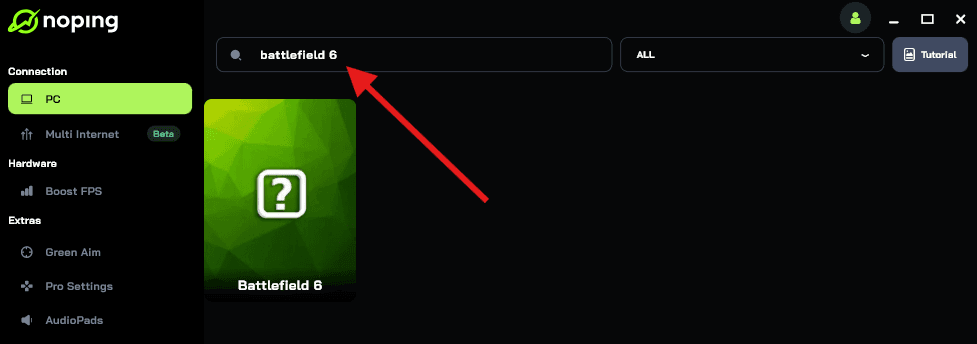
- Once you find Battlefield 6, click on it. Choose your server on the next screen and click on “Optimize Game”.
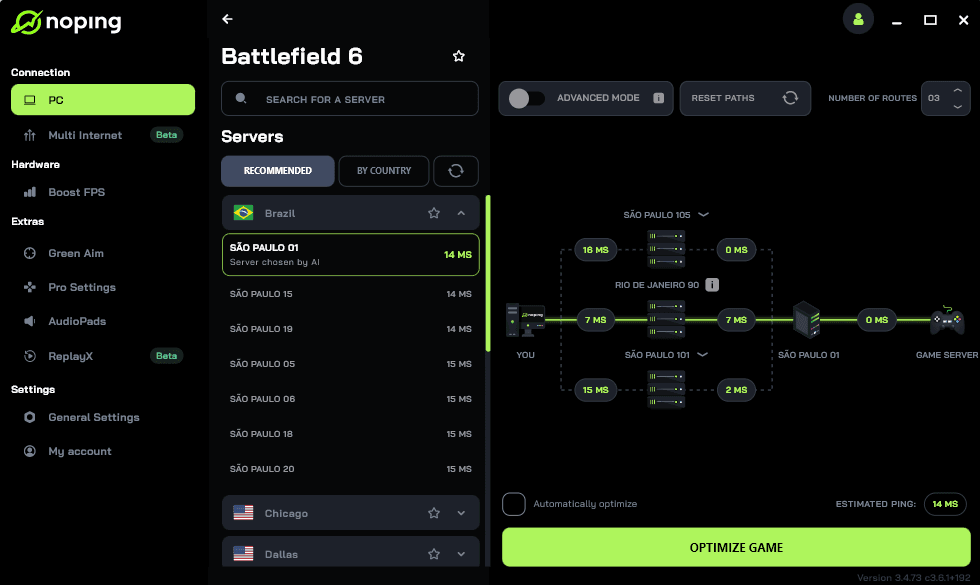
- And that’s it, you can start playing Battlefield 6 with optimized ping!
You can test different servers within NoPing to see which gives you the lowest latency.
So is Battlefield 6 cross platform? Yes, Battlefield 6 supports crossplay between PC, PS5 and Xbox Series X|S and it supports cross-progression through your EA account.
However the system tries to prioritize like-for-like console matchmaking where possible and gives console players the option to avoid PC crossplay, with the caveat that matchmaking may relax that setting to avoid long waits.
If you want to keep your progress across devices make sure all platform accounts are linked to the same EA ID.
And to always play Battlefield 6 with top performance, use NoPing! Download now and start your free trial!