


Finding your Roblox achievements on Xbox is a straightforward process once you know where the console hides its game activity data.
Unlike the PC or mobile versions where you primarily deal with in-game badges, the Xbox version of Roblox features a dedicated set of platform-level achievements that contribute directly to your Gamerscore.
So, how can I find the Roblox achievements on my Xbox console?
You can find your Roblox achievements by using the Xbox Guide button on your controller. While you are inside the Roblox app, press the Xbox button to open the guide, navigate to the Game Activity tab (represented by a controller icon), and select Achievements.
This will show you a list of all possible achievements for Roblox, which ones you have already unlocked, and your progress on the ones that are still locked.
If you are not currently playing the game, you can still see them by going to your profile. Select your avatar at the top left of the Xbox home screen, go to My Profile, then scroll over to the Achievements tab.
Locate Roblox in your list of recently played games to see the full breakdown. This section is particularly useful because it allows you to compare your progress with friends, showing you who has the higher Gamerscore in the world of Roblox blocks.
What are the specific achievements available for Roblox on Xbox?
There are currently 11 achievements available for the Roblox app on Xbox, totaling 1000 Gamerscore.
These achievements are focused on app usage and social interaction rather than specific goals within individual user-created games.
The list includes:
| Achievement Name | Requirement | Gamerscore |
| Scout | Play one Roblox game. | 10G |
| Explorer | Play five different Roblox games. | 50G |
| Trailblazer | Play fifteen different Roblox games. | 200G |
| Pollster | Rate five Roblox games (thumbs up or down). | 50G |
| Marathon | Play a Roblox game for one hour. | 50G |
| One Name, Many Faces | Change your avatar's look. | 50G |
| Strength in Numbers | Join an Xbox party and play a Roblox game. | 45G |
| Four's Company | Play a Roblox game with three of your friends. | 45G |
| 3 Day Roll | Play Roblox three days in a row. | 100G |
| 10 Day Roll | Play Roblox ten days in a row. | 200G |
| 20 Day Roll | Play Roblox twenty days in a row. | 200G |
These achievements are designed to encourage you to explore the variety of the platform.

What is the difference between Xbox achievements and in-game badges?
The main difference is that Xbox achievements are tied to your Microsoft account, while badges are created by game developers and stay within the Roblox ecosystem.
When you unlock an Xbox achievement like Trailblazer, you receive Gamerscore that increases your overall Xbox profile rank. These are official milestones recognized by Microsoft.
In contrast, badges are specific to individual experiences within Roblox, such as "Adopt Me" or "Blox Fruits."
These do not grant Gamerscore. You can see these badges by viewing your Roblox profile inside the app or on the Roblox website.
To see your earned badges on Xbox, you need to go to your Roblox Profile within the game's main menu and look for the Badges section.
It is a bit confusing at first because "achievement" is a general term, but on Xbox, always look at the system menu for Gamerscore and the in-game profile for badges.
Also read: How to Unblock Someone on Roblox?
Why is your achievement progress not updating or popping?
Achievement tracking on Xbox sometimes experiences delays due to server synchronization issues.
If you have played for an hour but the Marathon achievement hasn't unlocked, it might be stuck in a "Done! Unlocking" state.
This usually happens when the Xbox network is under heavy load or if your console has been in "Instant On" mode for too long without a full restart.
To fix this, try a full power cycle. Hold the Xbox button on the front of the console for 10 seconds until it shuts down completely, then unplug the power cord for a minute. When you reboot, the system should resync with the Xbox servers.
Also, ensure you are not playing in "Offline" mode, as achievements require a connection to the Xbox network to validate the unlock. You can check the current status of the Xbox services at the Xbox Support Status page.
Also read: How to Run Roblox at Max Settings With a Laptop
How to successfully complete the 20-day streak achievement?
The 20 Day Roll achievement is notoriously finicky because it relies on the GMT time zone for its daily reset.
To ensure you don't lose your streak, you must log into the Roblox app and actually launch a game every single day for 20 consecutive days.
Simply opening the app to the main menu is often not enough to trigger the daily count.
The most reliable strategy is to force close the Roblox app every time you are done playing.
On the Xbox dashboard, highlight Roblox, press the Menu button (the one with three lines), and select Quit.
This ensures that the next time you open it, the app performs a fresh handshake with the servers.
Since the reset happens at midnight GMT, you should check what time that is in your local area to avoid missing the window.
Many players find it helpful to set a daily alarm on their phone to make sure they don't forget day 18 or 19 and have to start all over.
Does your internet connection affect achievement unlocking?
Yes, a stable connection is vital for unlocking achievements because the Xbox One and Series X/S consoles use a server-side verification system.
Unlike the older Xbox 360 days where achievements could pop offline, modern consoles must "check in" with Microsoft's servers to confirm you met the criteria.
If your ping is fluctuating or you are experiencing packet loss, the signal that you completed an achievement might not reach the server correctly.
In multiplayer-focused achievements like Strength in Numbers or Four's Company, lag can be even more detrimental.
If your connection drops while you are in a party with friends, the game might not register that you were all playing together at the moment the achievement should have triggered.
This is where connection optimization becomes a game changer. Using NoPing helps maintain a stable route between your console and the game servers, reducing the chances of a "glitched" achievement caused by a momentary timeout.
Here’s how to use NoPing to fix lag in Roblox:
- Sign-up through the website and download NoPing (you can try it for free)
- Open NoPing and search for Roblox inside the software
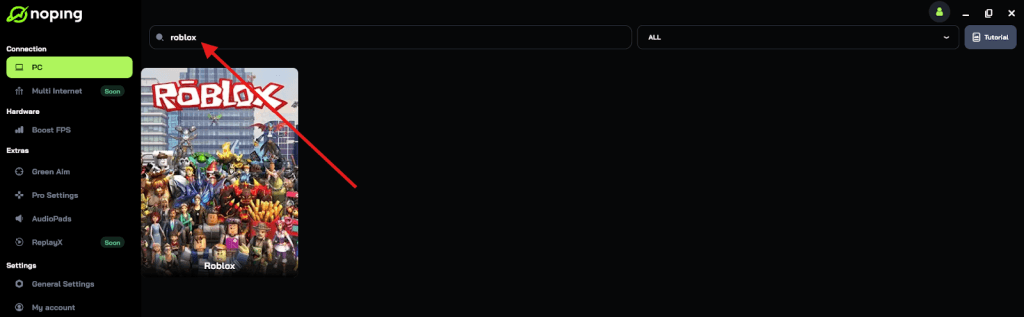
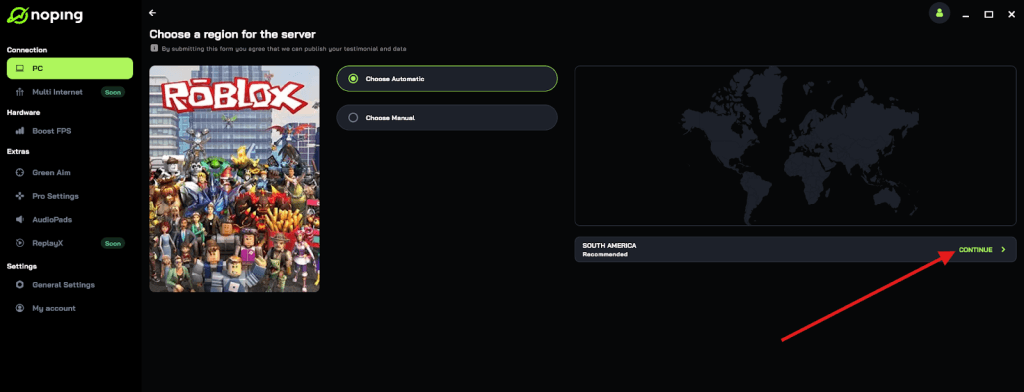
- Once you find Roblox, click on it and, on the next screen, select “Choose automatic” or “Choose manual” and click “Continue”. We recommend choosing automatic, as NoPing’s technology analyzes all routes on a global scale and automatically selects the best option for you.
- On the next screen, click on “Optimize Game”.
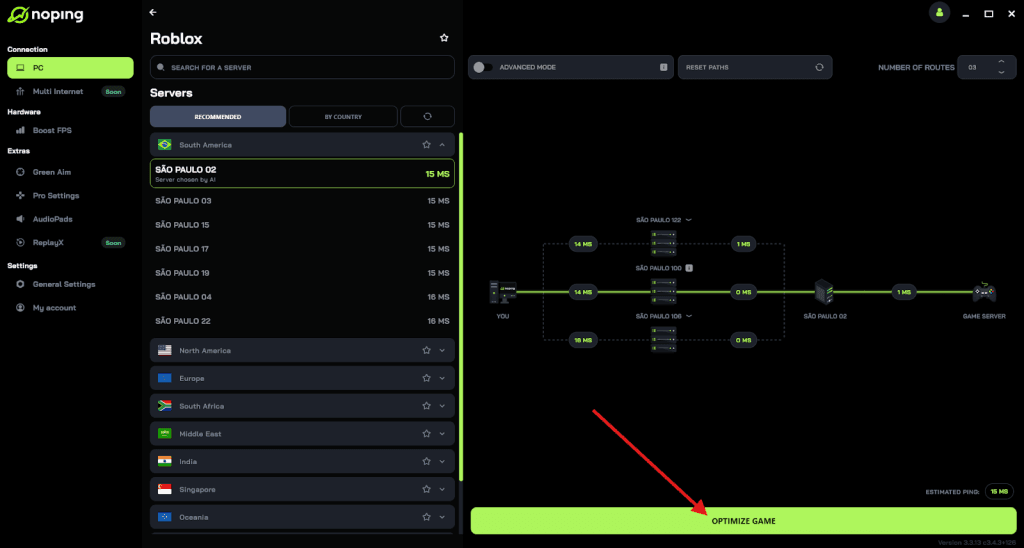
- And that’s it, you can start playing Roblox with optimized ping!
You can test different servers within NoPing to see which gives you the lowest latency.
Can you earn Roblox achievements on Xbox if you play on PC?
You cannot earn Xbox achievements while playing on the PC or mobile versions of Roblox, even if you are using the same Roblox account.
These 11 specific achievements are exclusive to the Xbox console application. However, because Roblox supports cross-progression, your avatar changes and game history will sync across platforms.
If you want to hunt for that 1000G, you must specifically log into your account on an Xbox console and perform the tasks there.
For example, if you change your avatar on your phone, you might need to log into the Xbox version and make one small adjustment there for the One Name, Many Faces achievement to trigger on the console.
The system needs to see the action happening or being verified through the Xbox app interface.
How to find friends to help with the "Four's Company" achievement?
Finding three friends who are online at the same time can be a challenge, but the Xbox community makes it easier through the Looking for Group (LFG) feature.
You can find people by pressing the Xbox button, going to People, and selecting Looking for Group.
Search for Roblox, and you will see dozens of posts from other players specifically looking to "boost" the Four's Company and Strength in Numbers achievements.
Since Roblox is a social platform, you can also add players you meet in-game as Xbox friends.
Once you have three people on your friend list who are currently in the same Roblox game as you, the achievement should unlock.
Just remember that they must be on your Xbox friend list, not just your Roblox friend list, for the console to recognize the achievement criteria.
Play Roblox without lag. Download NoPing now and start your free trial!