


Getting hit by error code 285 on Roblox while you are right in the middle of a high stakes match or a complex build is one of the most frustrating experiences for any player.
You are doing your thing, the connection seems fine, and suddenly the screen dims and a message pops up saying "Disconnected: Client initiated disconnect." It feels like the game just decided to kick you out for no reason.
Whether you are a competitive player or someone who just wants to relax in their favorite tycoon, understanding why your connection dropped is the first step toward making sure it never happens again.
This guide will walk you through every technical detail and solution to get you back into the game.
What is Error Code 285 on Roblox?
Error code 285 on Roblox is a connection error that signifies a "Client Initiated Disconnect," meaning the connection between your device and the game server was intentionally closed.
While the phrasing suggests your computer chose to leave, the reality is often more complex.
This code is a catch-all for situations where the server or the client shuts down the session without providing a specific reason like "kicked by moderator" or "internet lost."

Source: Roblox
When you see this error, it usually indicates that the communication loop between the Roblox client on your PC or mobile device and the remote server has been broken.
It is a general disconnection notice.
Unlike error 277, which explicitly points to a lost internet connection, or error 268, which suggests a kick for suspicious activity, error 285 is often a sign of a "clean" but unexpected exit.
This can happen because the server you were on was closed by the developer for an update, or because your local network configuration sent a signal that terminated the session prematurely.
Understanding this error requires looking at both ends of the bridge. On one side, you have your hardware, your router, and your ISP.
On the other side, you have the Roblox infrastructure and the specific code written by the game developer. When these two sides stop talking to each other properly, error 285 is the result.
Also read: What Was The First Roblox Game? Let’s Find Out
How to Fix Error Code 285 on Roblox
To fix error code 285 on Roblox, you should start by checking the official Roblox status page to see if there is a platform wide outage.
If the servers are healthy, the next best steps include power cycling your router, flushing your DNS cache, and ensuring your Roblox client is fully updated.
Because this error can stem from various sources, a systematic approach is necessary.
Below is a detailed breakdown of the most effective solutions, ranked from the simplest to the more technical configurations.
1. Check the Roblox Server Status
Before you start changing your computer settings, verify if the problem is even on your end.
If the Roblox servers are undergoing maintenance or experiencing a surge in traffic, no amount of local troubleshooting will help.
Visit the official status page or third party sites like DownDetector. If you see a spike in reports, the only real solution is to wait for the engineers to stabilize the platform.
2. Restart Your Device and Network Hardware
It sounds like a cliché, but a "power cycle" fixes a surprising number of connection issues. Turn off your computer or mobile device.
Then, unplug your router and modem from the wall. Wait at least sixty seconds to allow the capacitors to discharge completely.
Plug them back in, wait for the lights to stabilize, and restart your game. This clears temporary memory glitches in your hardware that might be triggering a "client initiated disconnect" signal.
3. Flush Your DNS Cache
Your computer stores a directory of IP addresses for websites and servers you have visited.
If the information for the Roblox servers has changed or become corrupted, your client might try to connect to an old "address," leading to a disconnect.
You can fix this by following these steps on Windows:
- Press the Windows Key and type cmd.
- Right click Command Prompt and select Run as Administrator.
- Type ipconfig /flushdns and press Enter.
- Restart your Roblox client.
4. Change Your DNS Servers
Sometimes your Internet Service Provider (ISP) has a slow or unstable DNS.
Switching to a more reliable public DNS like Google or Cloudflare can provide a more stable path to gaming servers.
- Open Settings > Network & Internet > Status.
- Select Change adapter options.
- Right click your active connection and select Properties.
- Select Internet Protocol Version 4 (TCP/IPv4) and click Properties.
- Select Use the following DNS server addresses.
- Set the Preferred DNS to 8.8.8.8 and the Alternate DNS to 8.8.4.4.
5. Clear Roblox Temporary Files
Corrupted cache files can interfere with the way the game communicates with the server. Clearing these files forces the game to rebuild its temporary data from scratch.
- Press Windows + R on your keyboard.
- Type %localappdata% and hit Enter.
- Find the Roblox folder and delete it.
- Note that you will need to log back in once you restart the game.
6. Use NoPing
If the error persists, the issue might be "bad routing." This happens when your ISP sends your data through a long, congested path before it reaches the Roblox servers.
NoPing works by calculating the shortest and most stable route between your computer and the game server.
By bypassing congested internet hubs, it reduces the chances of a packet loss event that could trigger a client initiated disconnect. If you are tired of dealing with manual network configurations, this is often the most efficient way to ensure a stable session.
Here’s how to use NoPing to fix lag in Roblox:
- Sign-up through the website and download NoPing (you can try it for free)
- Open NoPing and search for Roblox inside the software

- Once you find Roblox, click on it and, on the next screen, select “Choose automatic” or “Choose manual” and click “Continue”. We recommend choosing automatic, as NoPing’s technology analyzes all routes on a global scale and automatically selects the best option for you.
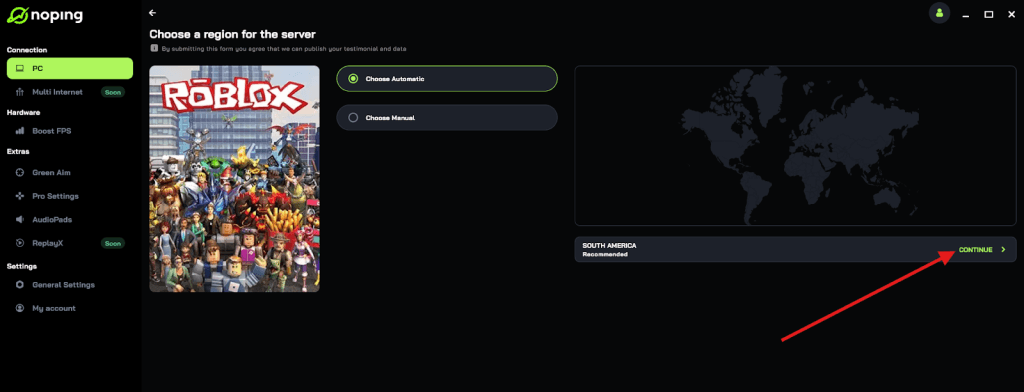
- On the next screen, click on “Optimize Game”.
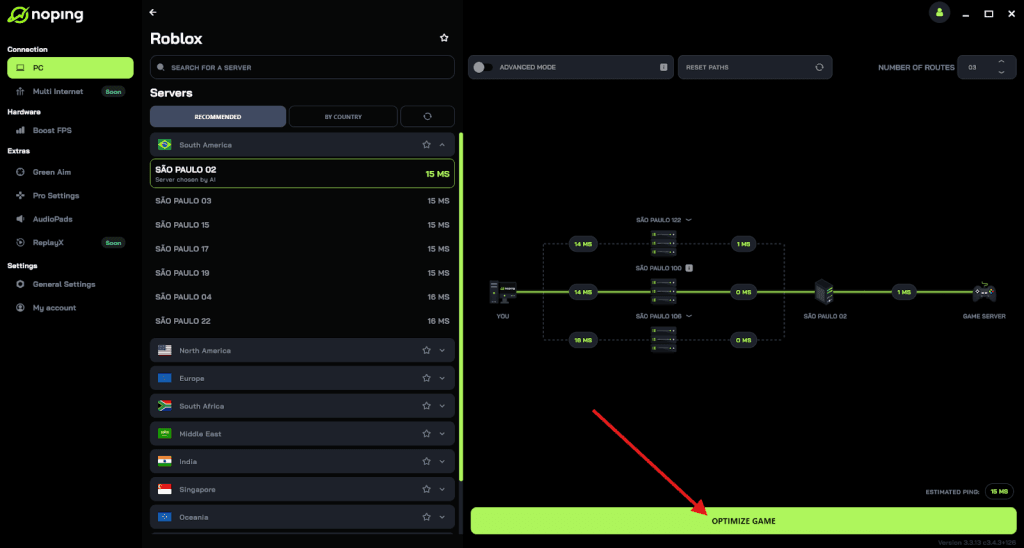
- And that’s it, you can start playing Roblox with optimized ping!
You can test different servers within NoPing to see which gives you the lowest latency.
What Causes Error Code 285 on Roblox?
The primary causes of error code 285 on Roblox are game server shutdowns, script errors within a specific experience, or local network instability that causes the client to time out.
While the error message is vague, the root cause is usually a break in the "handshake" between the user and the host.
Game Developer Actions
One of the most common reasons for this specific code is that the developer of the game you are playing has decided to close that specific server instance.
This often happens when an update is being pushed out. Instead of a "Server is shutting down for maintenance" message, the game simply closes the connection, leading to a 285 error.
If you notice this happening only in one specific game, it is almost certainly a developer side issue.
Rejoin Script Bugs
Many Roblox experiences use custom scripts to allow players to rejoin the same server or move between different "places" within the same universe.
If a script tries to send you to a server that is currently in the process of shutting down because the last player just left, the system will throw a 285 error. This is a synchronization bug that is out of the player's control.
Network Jitter and Packet Loss
Even if your internet speed is high, "jitter" (the variance in time between data packets) can cause the Roblox client to think the connection is dead.
When the client stops receiving a heartbeat signal from the server for a few seconds, it may initiate a disconnect to prevent the game state from becoming completely desynced. This is where high quality routing becomes essential.
Other Roblox Error Codes
While error 285 is common, Roblox has a variety of other codes that point to specific hardware, software, or network problems.
Knowing the difference between them can save you hours of unnecessary troubleshooting.
| Error Code | Meaning | Common Fix |
| 261/262 | Data Streaming Error | Check internet speed and reduce background downloads. |
| 264 | Same Account Logged In Elsewhere | Log out of all other devices and change your password. |
| 268 | Unexpected Client Behavior | Disable any third party software or exploits; restart your PC. |
| 273 | Disconnected from another device | Ensure no one else has access to your account. |
| 277 | Lost Connection | Check your router and physical cables; usually a local outage. |
| 278 | Kicked for being AFK | Ensure you move your character at least once every 20 minutes. |
| 280 | Outdated Roblox Version | Reinstall the client or update through the app store. |
| 524 | Permission Denied | Verify the game is public or you have an invite to the private server. |
| 529 | Technical Difficulties | This is almost always a Roblox server issue; wait it out. |
| 610 | HTTP 400 Error | Log out and log back in; usually a web browser glitch. |
Play Roblox without lag. Download NoPing and start your free trial!