

The error code 529 in Roblox is an HTTP/connectivity error that usually means the Roblox client couldn’t complete a normal request to Roblox’s servers, often because a server is overloaded, misconfigured, or temporarily down.
In plain terms: it’s usually not your PC’s fault, and it’s frequently a server-side hiccup.
This article explains what the error is, why it happens, practical fixes grouped by type, what usually causes it, and quick comparisons to other common Roblox error codes so you can troubleshoot efficiently.
What is Error Code 529 in Roblox?
Error code 529 is commonly reported as an HTTP error between the Roblox client and Roblox’s backend.
Players see messages saying the app is having technical difficulties or that an HTTP error occurred.
Error code 529 is either server overload, an improperly configured forwarding server in Roblox’s server pool, or temporary downtime/maintenance.
In short, 529 usually means the problem is on Roblox’s side or with how your connection is being routed to Roblox servers; not that your account is banned or the game is blocked.

Source: Developer Forum Roblox
Guide to Fix Error Code 529 in Roblox
Below I divide practical fixes into quick checks you can do immediately, network fixes you control, client-side fixes, and more advanced steps. Start at the top and work down; many people fix it with a simple retry or by switching platforms.
Quick checks (fast and easy)
- Close the client and try again
Sometimes the error is transient. Fully exit Roblox (not just close the window) and reopen. If the error was a short-lived server hiccup, a retry will work. - Check Roblox’s status page and social channels
If Roblox has an outage or large-scale issue, you’ll often find notices on the Roblox Status page or on official Twitter/X updates. When outages happen, many players see 529 simultaneously. If the status page shows degraded service or outage, the only real fix is waiting for Roblox to resolve it. - Try a different device or platform
If you were on mobile, try PC (or vice versa). Some community reports say one platform could be routed to a problematic server while another isn’t. If a different platform works, that points to a server routing issue rather than your home network.
Network fixes (your modem/router/internet)
Restart modem and router
Power-cycle your modem/router for 30 seconds. This forces a fresh connection to your ISP and may change routing.
Switch from Wi-Fi to wired (or vice versa)
If you have Ethernet available, plug directly into the router — that reduces packet loss and routing instability. If you’re on Wi-Fi and can’t wire, try moving closer to your router.
Flush DNS and renew IP (Windows example)
Open Command Prompt (Admin) and run:
ipconfig /flushdns
ipconfig /release
ipconfig /renew
This can help if stale DNS entries or a bad local route were involved.
Change DNS providers (optional)
Temporarily try public DNS like Google (8.8.8.8 / 8.8.4.4) or Cloudflare (1.1.1.1). Sometimes DNS resolution issues can worsen HTTP/connection errors.
Client-side fixes (PC / app)
- Update Roblox and your OS
Make sure you’re running the latest Roblox client and that your operating system has recent network drivers. - Reinstall Roblox
If the client is corrupted, a fresh install can remove weird edge-case failures. Uninstall, restart your machine, then reinstall from roblox.com. - Clear Roblox caches and temporary files
On Windows you can remove %localappdata%\Roblox contents (make a backup of anything important) then relaunch Roblox. - Check firewall and antivirus settings
Ensure Roblox is allowed through your firewall. Some security tools can block certain HTTP endpoints that Roblox uses. - Use the browser-to-app flow carefully
If you join games via the browser, ensure the browser handshake to the Roblox protocol is clean; sometimes using a different browser helps (Chrome vs Edge vs Firefox).
Advanced checks (if you're comfortable)
- Check for problematic server pools (community/devforum clues)
Developers and users on the Roblox DevForum have suggested 529 sometimes corresponds to specific server pools that are misconfigured; if you can reproduce 529 repeatedly for a given place but others can join, mention it on DevForum or to the game creator. Devs can check server-side logs. - Capture logs and report to Roblox Support
If you can reproduce reliably, collect network logs or screenshots, note the time and place ID, and submit to Roblox Support. Include platform, device, and any error text. - Test on a different network (mobile hotspot)
If you can, tether your phone and try joining via mobile data to see whether the issue is your ISP routing.
When waiting is the only realistic option
Because 529 is often server-related, sometimes the most practical step is to check status and wait. Most Roblox outages or overloaded server issues are resolved within tens of minutes to a few hours.
Community threads report many 529 incidents resolve after Roblox fixes server-side problems.

What Causes Error Code 529 in Roblox?
Short answer: routing, server overload, or misconfigured server pools. Longer answer — several things can trigger 529:
- Roblox backend or game server pool problems: Roblox uses many server clusters and routing systems. If a particular intermediate server is misconfigured, requests redirected there can fail with HTTP-like errors. DevForum threads point to this as a common reason.
- Temporary maintenance or outages: planned maintenance or partial outages lead to many players receiving HTTP errors until services come back.
- ISP routing issues or DNS problems: bad routing between your ISP and Roblox’s servers can produce failed HTTP requests even if your general internet seems fine. Trying a different network often reveals this.
- Client handshake problems or corrupted local files: less common, but a corrupted client or blocked local firewall/antivirus can stop the HTTP handshakes Roblox needs.
Because 529 is generally a connectivity/HTTP problem, many standard local troubleshooting steps (restarting, reinstalling, switching networks) help in a minority of cases; in many others Roblox needs to act.
Other Error Codes in Roblox
Below are concise descriptions of several related and commonly-encountered Roblox error codes so you can tell them apart.
- Error Code 524 — “You do not have permission to join this game”
This one usually means permission/privacy settings or trying to join a private/VIP server without authorization. Roblox’s official help explains this is often about permissions, not connectivity. - Error Code 600 — “Banned from an Experience”
Error 600 indicates the experience (game) creator has banned your account from that experience. This is not a Roblox platform ban; it’s a creator-issued ban for that game. Roblox Help documents this explicitly. - Error Code 0 — generic connectivity/authentication failure
Community resources describe 0 as a low-level failure where Roblox can’t complete authentication or network handshakes. It’s broad and usually treated as a network/connection problem; fixes overlap with 277/279/529 steps. - Error Code 277 — “Lost connection to the game server, please reconnect”
Official Roblox docs show 277 is a network disconnection between the client and the game server. Causes include unstable internet, server crashes, faulty game scripts causing the server to hang, or local network issues. Many troubleshooting pages give network-focused fixes for 277. - Error Code 279 — “Failed to connect to the Game”
Roblox’s help article says 279 occurs when client and server can’t establish a network connection. Fixes parallel 277: firewall settings, router ports, network stability.
How to Play Roblox Without Lag?
NoPing is a service designed to optimize your route to Roblox’s servers. Sometimes, the normal path your internet provider uses isn’t the fastest.
NoPing reroutes your data through a better, more direct path.
Here’s how to use NoPing to fix lag in Roblox:
- Sign-up through the website and download NoPing (you can try it for free)
- Open NoPing and search for Roblox inside the software
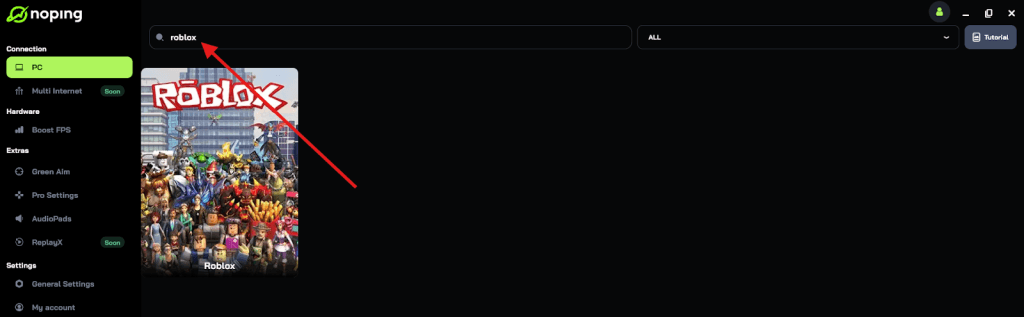
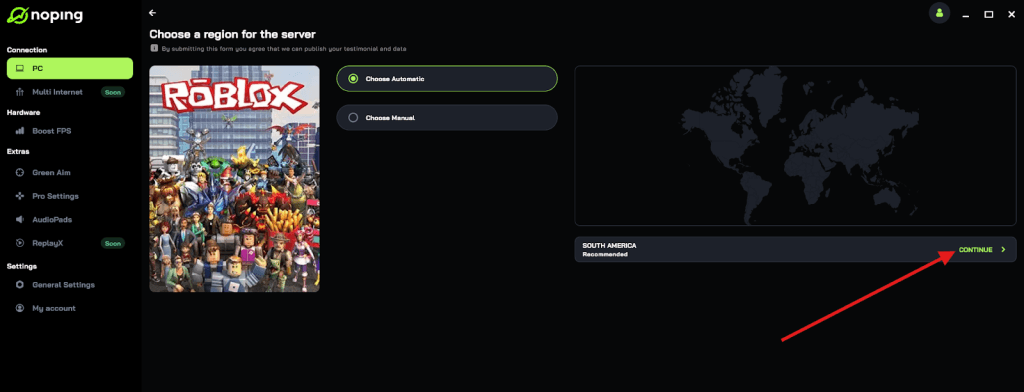
- Once you find Roblox, click on it and, on the next screen, select “Choose automatic” or “Choose manual” and click “Continue”. We recommend choosing automatic, as NoPing’s technology analyzes all routes on a global scale and automatically selects the best option for you.
- On the next screen, click on “Optimize Game”.
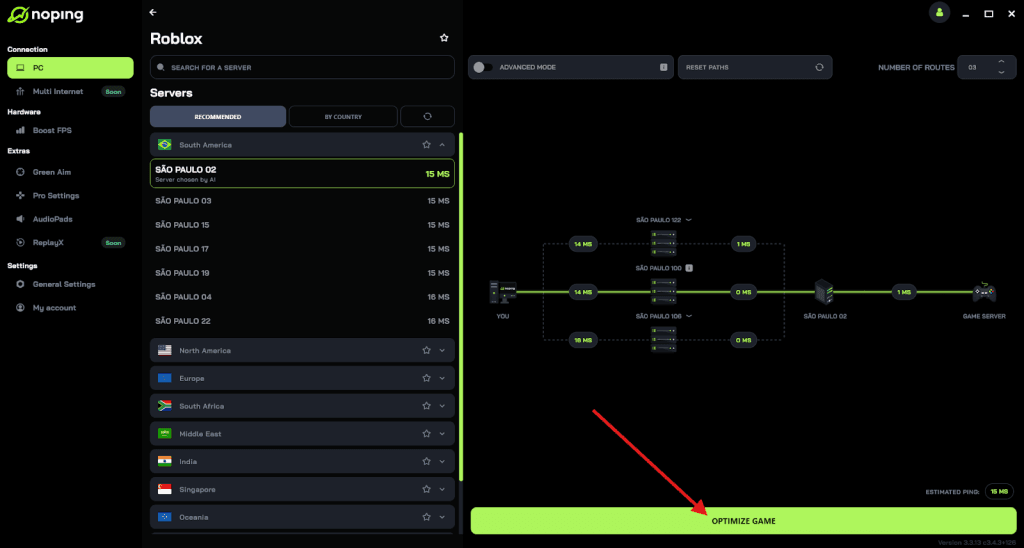
- And that’s it, you can start playing Roblox with optimized ping!
You can test different servers within NoPing to see which gives you the lowest latency.
FAQ - error code 529 in Roblox
Q: Is error 529 an account ban?
A: No. 529 is not a ban. It’s a connectivity/HTTP/server routing error. If you see messages about bans or account restrictions, that’s a different error code (like 600).
Q: How long does 529 usually last?
A: There’s no fixed time. Many incidents resolve in 30–60 minutes when Roblox fixes the affected server pool; larger outages take longer. The best indicator is Roblox’s status page and social updates.
Q: Should I file a support ticket for a 529?
A: If 529 is persistent for many hours or you can reproduce it for a single place repeatedly while others can join, collect timestamps, place IDs, platform info and file a ticket. For one-off transient 529s, checking status and retrying is faster.
Q: Can developers fix 529 from their side?
A: If players report repeated 529 for a specific place, developers should check server side logs and health for their servers and contact Roblox support if there’s evidence of a misconfigured or overloaded server pool. DevForum threads show devs often coordinate with Roblox when specific server pools misbehave.
Play Roblox with top performance to avoid any errors! Download NoPing now and start your free trial!