


Battlefield 6 and Valorant have recently run into a weird and frustrating problem for some PC players: both games use aggressive, kernel-level anti-cheat systems and, in certain situations, those systems can step on each other’s toes so badly that you cannot run both games on the same machine at the same time.
That sounds annoying because it is annoying, but the situation has a clear technical cause and some practical workarounds you can try.
Below I’ll explain what’s happening, why it matters, and concrete steps to fix or mitigate the problem.
Quick primer: what are kernel-level anti-cheats and why do studios use them
Anti-cheat software tries to detect and block programs that give players unfair advantages. Some anti-cheats run only while the game runs and operate at the user level.
Others go deeper and install a kernel-mode driver that runs with the highest privileges in Windows.
That deeper approach gives the anti-cheat more visibility and control over low-level system behavior and makes it harder for cheat authors to hide their code.
Riot’s Vanguard and EA’s Javelin are both examples of anti-cheats that involve kernel-mode components.
Running at kernel level makes detection more powerful, but it also raises complexity and compatibility risks.
Source: Reddit
What exactly is the conflict between Valorant and Battlefield 6
Riot and EA picked different implementations for their kernel drivers, but both attempt to protect or monitor similar memory regions and system resources to stop cheats.
When two kernel drivers try to control the same low-level areas or use similar protective techniques at the same time, they can conflict.
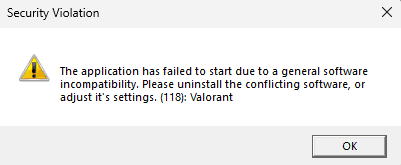
In practice that means one game might refuse to launch, the other might force you to uninstall its anti-cheat, or you might receive cryptic anti-cheat errors.
Riot’s security lead has publicly said that Vanguard is compatible with Javelin in principle, but the problem happens when both drivers are active at the same time and “compete” to protect the same memory regions.
Also read: How to Fix Packet Loss in Valorant? Complete Guide With Best Tips
Concrete steps to solve or mitigate the conflict
Below are practical actions you can take, ordered from easiest to more involved.
Close the other game and its launcher
If you want to play Battlefield 6, close Valorant and the Riot client entirely so Vanguard is not actively running in memory. If you want to play Valorant, close Battlefield 6 and any related EA processes.
In many cases simply ensuring only one anti-cheat driver is active at a time will let the desired game run. This is the simplest fix and is recommended as a first step.
Restart Windows to ensure only the anti-cheat you need loads
A fresh boot clears transient states and ensures only the anti-cheat of the game you launch first is loaded. Because kernel drivers often initialize at boot or when their client launches, a restart reduces race conditions.
Update Windows and drivers
Outdated or unsigned drivers are a common cause of anti-cheat blocks.
Update GPU drivers, chipset drivers, and Windows itself. Both EA and Riot anti-cheats will flag incompatible drivers. Keeping drivers current reduces false positives.
Enable Secure Boot if required
Some anti-cheats, including EA’s Javelin, require Secure Boot to be enabled on your PC.
Tests and reporting indicate that Secure Boot is an important requirement for BF6 on many systems and helps the anti-cheat work as intended. If you have a legacy BIOS setup or Secure Boot disabled, enabling it in your UEFI settings can resolve some installation and launch problems.
If you are unsure how to toggle Secure Boot, consult your motherboard manufacturer’s guide.
Reinstall the anti-cheat components
Both Riot and EA provide reinstall utilities or in-client options to repair Vanguard or Javelin. Doing a clean reinstall of the anti-cheat driver can remove corrupted installs and re-register the driver properly.
Use separate Windows installations as a last resort
If you need to play both frequently and keep hitting conflicts, one practical solution is to install one game on a separate Windows partition or a separate machine.
This avoids driver conflicts entirely but is obviously more work and not ideal for everyone.
Contact support and file bug reports
If none of the above work, file support tickets with EA and Riot. Include logs and a description of your system. The companies need reproducible reports to fix driver-level issues.
Also read: How to Fix Aim Snapping to Left in Battlefield 6
Why this causes such ugly user-facing messages
Anti-cheats are intentionally aggressive about blocking suspicious processes and drivers.
When a kernel driver encounters an unexpected peer driver that behaves in an incompatible way, the safest thing for the anti-cheat to do is to block execution or show a restriction.
That leads to messages like “incompatible driver detected” or prompts telling you to uninstall the other game’s client.
Those messages often feel like “you must choose one or the other” even though the underlying issue is a technical race or resource conflict between two privileged drivers.
Is one company at fault? Not really, but there are trade-offs
From a product standpoint, Riot and EA made design decisions to prioritize cheat prevention.
Kernel-level anti-cheats are effective at catching sophisticated cheats, but they introduce systemic risks: increased chance of driver conflicts, problems with other kernel software like security tools or custom drivers, and narrower compatibility with alternative OS setups like SteamOS or Linux.
Critics point out that kernel anti-cheats can block legitimate setups and reduce platform compatibility.
Still, both studios argue the benefits in catching cheaters outweigh the downsides. That trade-off is the root of the current friction.
Also read: Guide to Fix Battlefield 6 AntiCheat Error (EA Javelin)
How to tell whether you are affected
Typical signs you are affected include:
- Battlefield 6 shows an anti-cheat error that references another program or driver.
- Valorant refuses to launch while Battlefield 6 is running or vice versa.
- You receive messages asking you to uninstall the other game or its anti-cheat.
- Kernel-level crash logs or system instability near game launches.
If you see any of that, the conflict described above is a prime suspect. Several tech outlets and community posts have reported the same pattern, and Riot staff have clarified the cause publicly.
What the companies are saying and longer term fixes
Riot’s security team has publicly explained that Vanguard and Javelin are compatible in principle but can conflict when both try to protect the same memory regions at the same time.
Riot has also been exploring moving parts of Vanguard to a model that reduces kernel residency when feasible, following platform security advances.
EA is iterating on Javelin and related protections as well. Both companies are aware this kind of friction harms players and will likely keep working on better coordination and less intrusive anti-cheat operations over time.
Final recommendations and realistic expectations
If you want the smoothest experience today:
- Pick the game you plan to play and ensure only its client and anti-cheat are active.
- Keep Windows and drivers updated, enable Secure Boot if applicable, and use the anti-cheat repair tools from EA or Riot.
- If you constantly bounce between games and can, consider a dedicated install or machine to avoid driver contention.
Long term, expect studios to refine how kernel-level protections behave, to provide less persistent drivers where possible, and to coordinate better with hardware and OS vendors.
But kernel-mode anti-cheats are still a blunt instrument: they are effective against advanced cheats but carry real compatibility costs.
Until the industry converges on safer, less intrusive approaches, some friction between games that use different kernel protections is likely to pop up now and then.
Also read: Will Battlefield 6 Be on Game Pass?
How to play Battlefield 6 and Valorant without lag?
NoPing is a service designed to optimize your route to games’ servers. Sometimes, the normal path your internet provider uses isn’t the fastest. NoPing reroutes your data through a better, more direct path.
Here’s how to use NoPing to fix lag in online games:
- Sign-up through the website and download NoPing (you can test it for free).
- Open NoPing and search for your game inside the software
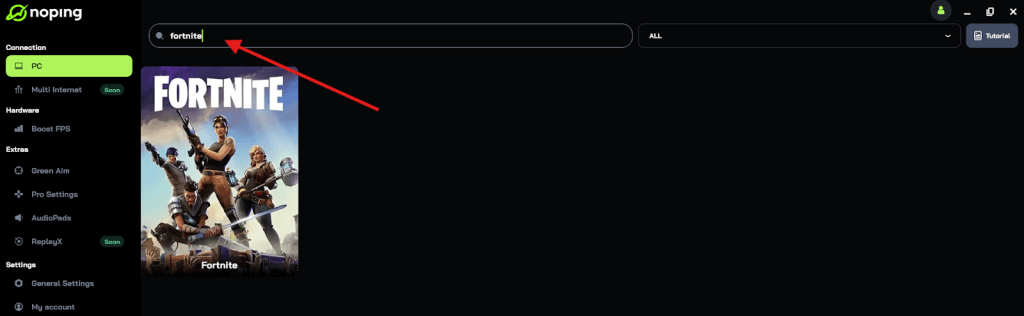
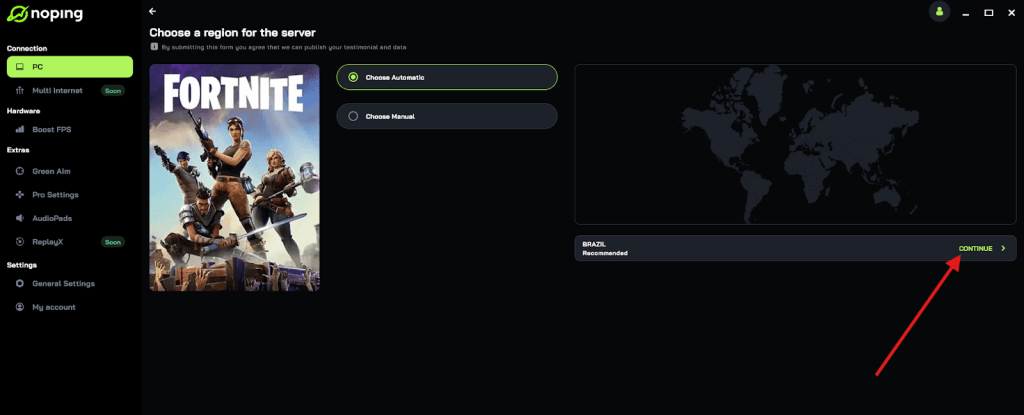
- Once you find it, click on it and, on the next screen, select “Choose automatic” or “Choose manual” and click “Continue”. We recommend choosing automatic, as NoPing’s technology analyzes all routes on a global scale and automatically selects the best option for you.
- On the next screen, click on “Optimize Game”.
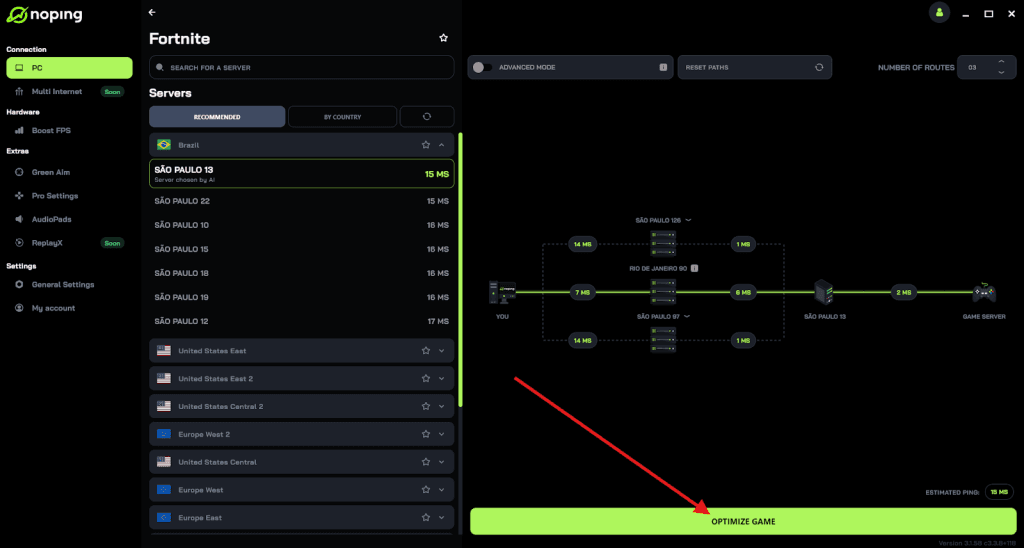
- And that’s it, you can start playing with optimized ping!
You can test different servers within NoPing to see which gives you the lowest latency.
Quick troubleshooting checklist
- Quit Valorant and Riot client before launching Battlefield 6, or vice versa.
- Reboot Windows.
- Update Windows, GPU drivers, and chipset drivers.
- Enable Secure Boot in UEFI if it is disabled.
- Run the anti-cheat repair tools in each client.
- If problems persist, collect logs and open support tickets with EA and Riot.
Play Battlefield 6 and Valorant without lag! Download NoPing now and start your free trial!