


"Black Ops 6 campaign co-op" is a question a lot of players have asked since the game launched, so let’s cut to the chase: the Black Ops 6 campaign is primarily a single-player experience and does not include an official co-op campaign mode.
Below I’ll explain what that means, where you can play co-op in Black Ops 6, how split-screen works (and its limitations), and give a short FAQ with extra details you might find useful.
So, Can I Play The Black Ops 6 Campaign Co-op?
Short answer: no, you cannot play Black Ops 6’s campaign in co-op. The campaign is a single-player mode only and does not support drop-in or dedicated co-op sessions through the official game modes.
Why is that the case? Campaigns are often written with a single-player perspective in mind: narrative beats, mission scripting, and checkpoint systems are optimized for a single player’s pacing.
Adding co-op can require reworking enemy scaling, mission flow, and checkpoints so multiple players can progress together without breaking storytelling beats.
Treyarch appears to have chosen to focus the campaign on a single-player theatrical experience and kept cooperative play for multiplayer and Zombies.
Two important related notes:
- The game does require an online connection for many features (including some single-player functionality tied to streaming or services), so even solo campaign play may need connectivity.
- Many players hoped for campaign co-op, and community discussions reflect disappointment, but the game does offer co-op-friendly modes elsewhere.
Also read: Black Ops 6 DirectX Error: What Causes and How to Fix
What Game Modes in Black Ops 6 Can I Play Co-op?
If you want to play with friends, here are the main co-op options available in Black Ops 6:
Multiplayer (Online and Local Split-Screen)
Standard competitive multiplayer supports teaming up with friends. You can play online together in private lobbies or public matches.
Split-screen (couch co-op) is also supported for multiplayer on consoles, although support can vary by platform and generation.

Zombies Mode
The Zombies experience has traditionally been co-op friendly, and Black Ops 6 continues that tradition.
You can team up online with friends in Zombies, and many players use Couch Co-op (split-screen) for local play on supported consoles.
The mode is explicitly designed for cooperative play against waves of AI enemies.

Special Co-op Events / Limited-Time Modes
Activision and Treyarch sometimes add limited-time or seasonal co-op events and playlists that enable teaming up for PvE or mixed objectives.
These are outside of the campaign but offer narrative-flavored or event-based cooperative experiences from time to time.
News about free trials and temporary access sometimes highlights these modes, so keep an eye on official announcements.
So while the campaign itself is single-player, there are multiple robust ways to play cooperatively in the rest of the game.
Is There a Local Co-op (Split Screen) or Only Online Co-op?
Yes, Black Ops 6 does include split-screen support, but there are some caveats you should know:
Split-screen is supported mainly for multiplayer and Zombies: You can play couch co-op in multiplayer match types and in Zombies on supported platforms. The campaign does not support split-screen co-op.
Platform and generation restrictions: Split-screen support is best on current-generation consoles (PlayStation 5, Xbox Series X|S).
Older consoles may have limited or no split-screen support depending on the specific legacy platform build. Always check the platform notes for your system.

PC split-screen is uncommon: If you play on PC, local split-screen is generally not a standard option for Call of Duty titles. Most PC players use online multiplayer to team up. If local couch co-op is essential, consoles remain the go-to.
In summary, local split-screen co-op exists but not for the campaign; it’s concentrated in multiplayer and Zombies and its availability can depend on console generation.
How to Play Split-Screen in Black Ops 6?
If you want to set up split-screen for multiplayer or Zombies, here’s a practical, step-by-step guide (platform-agnostic) to get you going:
- Check your platform
Make sure your console supports split-screen for the chosen mode. Current-gen consoles (PS5, Xbox Series X|S) are the most reliable for split-screen support. PC players should expect to use online play for co-op. - Connect controllers and sign in
- For couch co-op, connect the second controller (and third/fourth if supported) to the console.
- Sign the secondary players into local accounts or guest profiles as required by the console. Some games require the additional players to have at least a guest account active.
- Launch the game
Start Black Ops 6 and wait for the main menu to recognize the additional controllers and accounts. - Add the second player
In the multiplayer or Zombies menu, look for an on-screen prompt to “Add Player” or “Press X / A to join” (button may vary by console). Follow the prompt to have the second user join the lobby. - Select mode and map
Once both local players are in the lobby, choose the multiplayer playlist or Zombies map you want to play. Note that some playlists or modes may not allow split-screen due to matchmaking or map constraints. - Check settings and start
Adjust any split-screen HUD or field-of-view options if available, then start the match. If you run into a restriction (such as matchmaking refusing split-screen in certain playlists), try switching to a different playlist or using a private match to bypass limitations.
Extra tips:
If you plan to play online with split-screen, know that the matchmaking system may pair you based on the primary account’s skill or region and that some features (cross-play, cross-gen matchmaking) may affect who you can play with.
For the smoothest experience, ensure both controllers and accounts are fully updated and the console firmware is current.
How to Play Black Ops 6 Co-op Without Lag?
If you’re planning to play Black Ops 6 co-op with friends, whether in Zombies or multiplayer, nothing ruins the fun faster than lag or connection drops.
A few milliseconds of delay can make a huge difference in a fast-paced game like Call of Duty.
That’s where NoPing comes in. NoPing is a performance optimization software that reduces latency (ping) by routing your connection through the fastest and most stable paths between your PC and the game server.
Here’s how to use NoPing to fix lag in Call of Duty:
- Sign-up through the website and download NoPing (you can try it for free)
- Open NoPing and search for Call of Duty inside the software
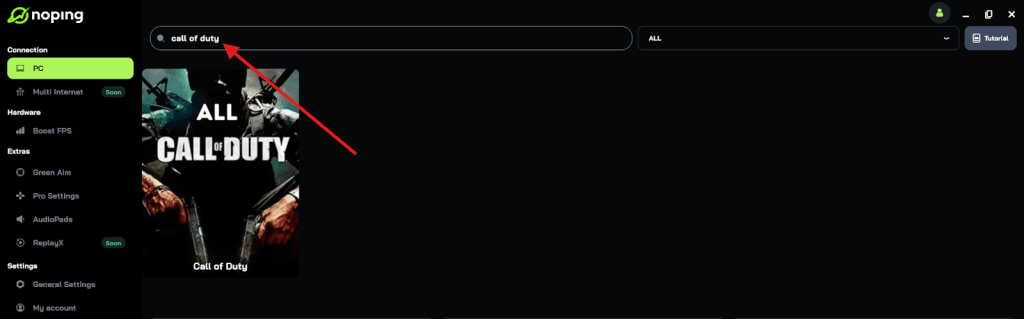
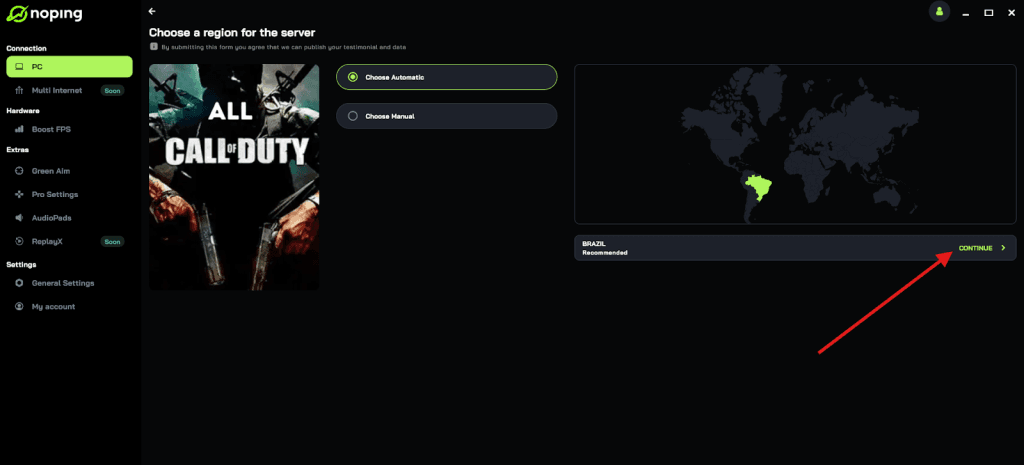
- Once you find Call of Duty, click on it and, on the next screen, select “Choose automatic” or “Choose manual” and click “Continue”. We recommend choosing automatic, as NoPing’s technology analyzes all routes on a global scale and automatically selects the best option for you.
- On the next screen, click on “Optimize Game”.
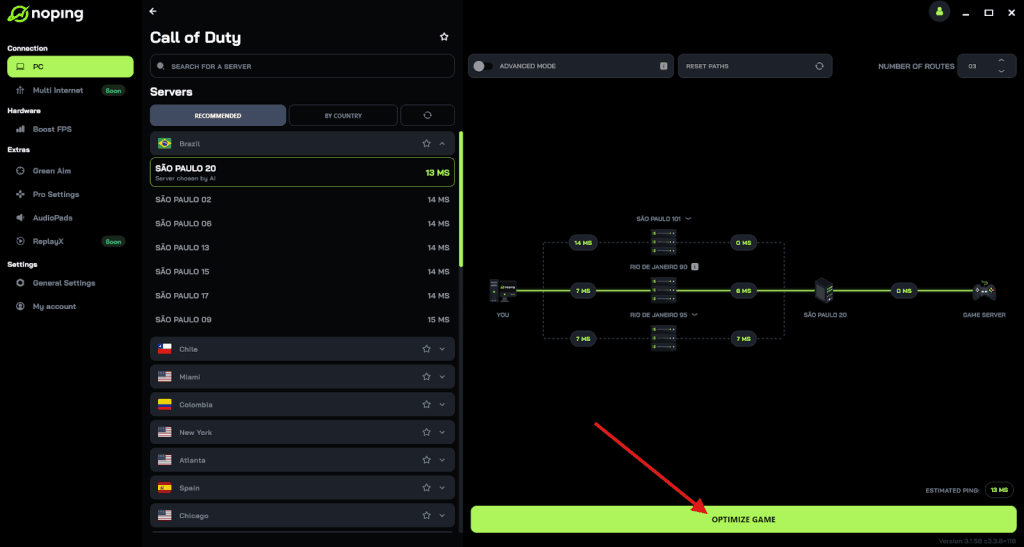
- And that’s it, you can start playing CoD with optimized ping!
You can test different servers within NoPing to see which gives you the lowest latency.
FAQ - Is Black Ops 6 Campaign Co-op?
Q: Does modding or community fixes enable campaign co-op?
A: There is no official co-op campaign, and on consoles modding is not a supported route. On PC, modding communities sometimes experiment with cooperative tweaks for other games, but for Call of Duty titles, campaign co-op via mods is extremely limited and often not feasible. Attempting unofficial workarounds can break the game or violate terms of service, so it is not recommended.
Q: Will Treyarch add co-op to the campaign in a future update?
A: There has been no official announcement indicating that campaign co-op will be added to Black Ops 6 post-launch.
Game developers sometimes add or change modes based on player feedback, but unless Treyarch or Activision states otherwise, the campaign remains single-player. Watch official channels for any changes.
Q: Can I play the campaign with friends using platform features like remote play or Party Share?
A: Some platform-level features (for example, Sony’s Remote Play together or Xbox Remote Play) let a friend view or control a session remotely, but they are not the same as native in-game co-op.
Performance and legality vary by platform and publisher settings, and many Call of Duty titles require an online connection or restrict remote sharing features. These are not guaranteed workarounds and often provide a subpar experience versus native co-op.
Q: Is there split-screen for more than two players?
A: Split-screen is typically limited to two players for most multiplayer playlists, though Zombies has historically supported more local players in some entries.
Actual player limits vary by mode and platform, so check the in-game lobby prompts for the maximum allowed local players.
Q: Does campaign progress or achievements get affected if I try platform workarounds?
A: Using unofficial methods or remote-control solutions to play together may affect how progress or achievements are tracked.
For official progression and achievement tracking, stick to supported game modes and official features.
If your main goal is to play the Black Ops experience with friends side by side or online, the good news is the game offers robust co-op opportunities in multiplayer and Zombies, and split-screen is available on supported consoles.
If your heart was set on playing the cinematic campaign co-op with a buddy, that option is not available in the official release: the campaign was built as a single-player experience.
And to always play Black Ops 6 with your friends without worrying about lag, use NoPing! Download now and start your free trial!